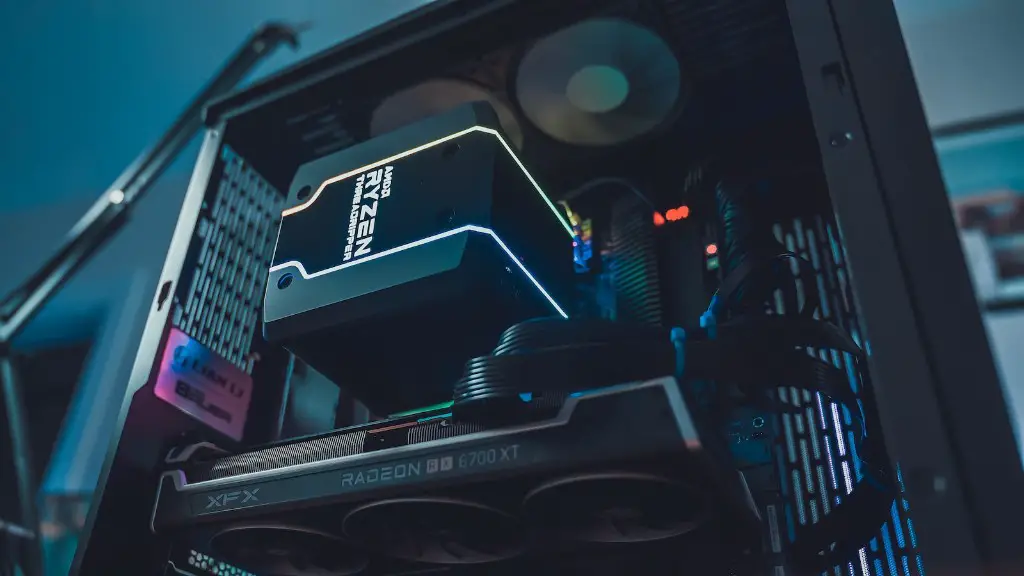
<p> When it comes to assembling a gaming PC, many consumers are unsure of the best way to go about doing it. The truth is, there is no single “best” option when it comes to selecting the right components for a gaming PC. However, some basic tips can be useful in helping someone decide what the best case for their system might be.</p>
<p>One of the most important considerations when selecting a gaming PC case is the size. Cases come in a range of sizes, from mid-tower cases to larger, full-tower cases. It’s important to consider the size of components you plan on installing, as well as the overall size of the gaming PC itself. If you plan on using a lot of graphics cards or large memory modules, you may need to go with a larger case.</p>
<p>Another key factor to consider when selecting a PC case is cooling. Most gaming PC cases come with built-in fans to help manage the system’s temperature. The number and size of the fans, as well as where they are located, can have a large impact on the performance and longevity of the system. Cases also have filters and vents that can help keep dust and other debris from entering the system, which can help keep the components running cooler and quieter.</p>
<p>The style of the gaming PC case is also an important factor to consider. Many cases come in a variety of colors and styles, allowing the user to customize the look and feel of their system. The type of materials used in the construction of the case can also have an effect on its durability and aesthetic appeal.</p>
<p>In addition to the core components of the case, it’s also important to consider the number and type of ports, such as USB and audio, that are available on the case. Some cases also come with a variety of options for mounting additional drives and cards.</p>
<p>Finally, it’s important to consider the budget when selecting a gaming PC case. While some cases may be more expensive than others, it is important to weigh the cost against the features and performance that a case provides.</p>
<h2>Types of Cases</h2>
<p>When looking for a case, there are several different types available. Mid-tower cases are smaller than full-tower cases, with the main difference between them being their size. One benefit of mid-tower cases is that they take up less room, making them easier to transport or fit into tighter spaces. Full-tower cases can support larger components, such as multiple graphics cards or extra hard drives, and are better suited for those who plan on making major upgrades in the future.</p>
<p>There are also mini-ITX cases, which are much smaller than traditional cases. These cases are designed to be as compact as possible, while still supporting a decent level of hardware. Mini-ITX cases are ideal for those who are looking to build a small, yet powerful, gaming PC.</p>
<p>Finally, there are cases designed specifically for LAN parties or travel. These cases are designed to be portable and light, while still providing the necessary protection for the components inside.</p>
<p>No matter what type of case you choose, it’s important to consider the size and cooling options of the case, as well as its style, port selection, and price.</p>
<p>When selecting components for a gaming PC, it is important to consider the case carefully. Choosing the wrong case can have an impact on the performance, cooling, and aesthetic of your system. By taking the time to consider all the options available, it is possible to find the best case for your gaming PC that is both functional and aesthetically pleasing.</p>
<h2>Cable Management</h2>
<p>When selecting a gaming PC case, it is important to consider cable management as well. Good cable management can help keep the interior of your case neat and organized. Some cases come with dedicated cable routing holes, allowing the user to route cables out of sight and provide easier access to certain components. In addition, certain cases offer modular cable routing, allowing the user to adjust the routing as needed.</p>
<p>It is also important to consider the number and types of ports available on the case. Cases that offer a wide range of ports, such as USB, audio, and video, can give users more options for connecting external components. Some cases also come with plenty of options for mounting additional components.</p>
<p>When selecting a case for a gaming PC, it is important to consider the cooling capabilities of the case. Most cases come with built-in fans to help manage the system’s temperature. Fans come in a variety of sizes, and it’s important to consider both the number and size of the fans, as well as where they are located. Cases also come with filters and vents, which can help keep dust from entering the system.</p>
<p>Cable management, port selection, and cooling are all important when selecting the best case for a gaming PC. By considering each of these factors and budgeting carefully, you can find the perfect case for your system.</p>
<h2>Support for Multiple GPUs</h2>
<p>If you plan on using multiple graphics cards in your system, it is important to consider how many cards your case can accommodate. Many cases can support at least two GPUs, while some cases can accommodate up to four GPUs. It is also important to consider the size of the graphics cards and if the case has enough room to fit them comfortably.</p>
<p>It is also important to consider the number and location of the additional slots on the case. Some cases may only have enough space for one additional card, while others may have space for two or more cards. Cases typically come with three to four expansion slots, so it is important to make sure your case has enough for the components you plan on installing.</p>
<p>Finally, it is important to consider the size and placement of the power supply. If you plan on using multiple GPUs or a large number of components, you will likely need a larger power supply. Cases typically have a specific area for the power supply to be mounted, so you need to make sure that your power supply will fit comfortably in the case.</p>
<p>If you plan on using multiple GPUs in your system, it is important to make sure that your case has enough room and has the right number and placement of expansion slots and power supply bays. By ensuring that your case has enough room and the correct number of ports and slots, you can ensure that your system will run optimally with multiple GPUs installed.</p>
<h2>Modular Features</h2>
<p>It is also important to consider the modular features of the case. Some cases come with removable components to make it easier to access certain areas of the case. For example, some cases come with removable drive bays, allowing you to easily remove the drive when needed.</p>
<p>Additionally, some cases come with modular parts that can be added or removed. This can be useful if you need to add more components or additional ports. It can also make repairs or upgrades easier, as some of the components can be removed or replaced without having to open the system.</p>
<p>Finally, some cases come with tool-less designs, allowing you to install or remove components without the need for any tools. This can make upgrades and repairs much easier, especially for those who are not comfortable using tools.</p>
<p>When selecting a gaming PC case, it is important to consider the modular features available. These features can make the system much easier to upgrade and repair, as well as provide easier access to certain components. By considering the modular features of a case, you can ensure that you have a system that is easy to upgrade and maintain over time.</p>
<h2>Case Price</h2>
<p>As with all components, the price of the case should also be taken into consideration when selecting the best case for a gaming PC. While more expensive cases may offer better cooling, more features, and more options for customization, they may not necessarily be the best fit for your needs. It is important to weigh the cost of the case against the features and performance that it provides.</p>
<p>In addition to the price, it is important to consider the quality of the case. Higher quality cases are likely to have better build quality and come with better warranties. If you plan on using your gaming PC for a long time and expect to make major upgrades in the future, it is important to choose a case that is well built and has a strong warranty.</p>
<p>Finally, it is important to consider the design of the case. By selecting a case that is aesthetically pleasing, you can ensure that your system looks its best and reflects your personal style.</p>
<p>When selecting a gaming PC case, it is important to consider the price, quality, and design of the case. By considering all of these factors, you can find a case that suits your needs and offers the best performance and value for your money.</p>
<p>One of the most important considerations when selecting a gaming PC case is the size. Cases come in a range of sizes, from mid-tower cases to larger, full-tower cases. It’s important to consider the size of components you plan on installing, as well as the overall size of the gaming PC itself. If you plan on using a lot of graphics cards or large memory modules, you may need to go with a larger case.</p>
<p>Another key factor to consider when selecting a PC case is cooling. Most gaming PC cases come with built-in fans to help manage the system’s temperature. The number and size of the fans, as well as where they are located, can have a large impact on the performance and longevity of the system. Cases also have filters and vents that can help keep dust and other debris from entering the system, which can help keep the components running cooler and quieter.</p>
<p>The style of the gaming PC case is also an important factor to consider. Many cases come in a variety of colors and styles, allowing the user to customize the look and feel of their system. The type of materials used in the construction of the case can also have an effect on its durability and aesthetic appeal.</p>
<p>In addition to the core components of the case, it’s also important to consider the number and type of ports, such as USB and audio, that are available on the case. Some cases also come with a variety of options for mounting additional drives and cards.</p>
<p>Finally, it’s important to consider the budget when selecting a gaming PC case. While some cases may be more expensive than others, it is important to weigh the cost against the features and performance that a case provides.</p>
<h2>Types of Cases</h2>
<p>When looking for a case, there are several different types available. Mid-tower cases are smaller than full-tower cases, with the main difference between them being their size. One benefit of mid-tower cases is that they take up less room, making them easier to transport or fit into tighter spaces. Full-tower cases can support larger components, such as multiple graphics cards or extra hard drives, and are better suited for those who plan on making major upgrades in the future.</p>
<p>There are also mini-ITX cases, which are much smaller than traditional cases. These cases are designed to be as compact as possible, while still supporting a decent level of hardware. Mini-ITX cases are ideal for those who are looking to build a small, yet powerful, gaming PC.</p>
<p>Finally, there are cases designed specifically for LAN parties or travel. These cases are designed to be portable and light, while still providing the necessary protection for the components inside.</p>
<p>No matter what type of case you choose, it’s important to consider the size and cooling options of the case, as well as its style, port selection, and price.</p>
<p>When selecting components for a gaming PC, it is important to consider the case carefully. Choosing the wrong case can have an impact on the performance, cooling, and aesthetic of your system. By taking the time to consider all the options available, it is possible to find the best case for your gaming PC that is both functional and aesthetically pleasing.</p>
<h2>Cable Management</h2>
<p>When selecting a gaming PC case, it is important to consider cable management as well. Good cable management can help keep the interior of your case neat and organized. Some cases come with dedicated cable routing holes, allowing the user to route cables out of sight and provide easier access to certain components. In addition, certain cases offer modular cable routing, allowing the user to adjust the routing as needed.</p>
<p>It is also important to consider the number and types of ports available on the case. Cases that offer a wide range of ports, such as USB, audio, and video, can give users more options for connecting external components. Some cases also come with plenty of options for mounting additional components.</p>
<p>When selecting a case for a gaming PC, it is important to consider the cooling capabilities of the case. Most cases come with built-in fans to help manage the system’s temperature. Fans come in a variety of sizes, and it’s important to consider both the number and size of the fans, as well as where they are located. Cases also come with filters and vents, which can help keep dust from entering the system.</p>
<p>Cable management, port selection, and cooling are all important when selecting the best case for a gaming PC. By considering each of these factors and budgeting carefully, you can find the perfect case for your system.</p>
<h2>Support for Multiple GPUs</h2>
<p>If you plan on using multiple graphics cards in your system, it is important to consider how many cards your case can accommodate. Many cases can support at least two GPUs, while some cases can accommodate up to four GPUs. It is also important to consider the size of the graphics cards and if the case has enough room to fit them comfortably.</p>
<p>It is also important to consider the number and location of the additional slots on the case. Some cases may only have enough space for one additional card, while others may have space for two or more cards. Cases typically come with three to four expansion slots, so it is important to make sure your case has enough for the components you plan on installing.</p>
<p>Finally, it is important to consider the size and placement of the power supply. If you plan on using multiple GPUs or a large number of components, you will likely need a larger power supply. Cases typically have a specific area for the power supply to be mounted, so you need to make sure that your power supply will fit comfortably in the case.</p>
<p>If you plan on using multiple GPUs in your system, it is important to make sure that your case has enough room and has the right number and placement of expansion slots and power supply bays. By ensuring that your case has enough room and the correct number of ports and slots, you can ensure that your system will run optimally with multiple GPUs installed.</p>
<h2>Modular Features</h2>
<p>It is also important to consider the modular features of the case. Some cases come with removable components to make it easier to access certain areas of the case. For example, some cases come with removable drive bays, allowing you to easily remove the drive when needed.</p>
<p>Additionally, some cases come with modular parts that can be added or removed. This can be useful if you need to add more components or additional ports. It can also make repairs or upgrades easier, as some of the components can be removed or replaced without having to open the system.</p>
<p>Finally, some cases come with tool-less designs, allowing you to install or remove components without the need for any tools. This can make upgrades and repairs much easier, especially for those who are not comfortable using tools.</p>
<p>When selecting a gaming PC case, it is important to consider the modular features available. These features can make the system much easier to upgrade and repair, as well as provide easier access to certain components. By considering the modular features of a case, you can ensure that you have a system that is easy to upgrade and maintain over time.</p>
<h2>Case Price</h2>
<p>As with all components, the price of the case should also be taken into consideration when selecting the best case for a gaming PC. While more expensive cases may offer better cooling, more features, and more options for customization, they may not necessarily be the best fit for your needs. It is important to weigh the cost of the case against the features and performance that it provides.</p>
<p>In addition to the price, it is important to consider the quality of the case. Higher quality cases are likely to have better build quality and come with better warranties. If you plan on using your gaming PC for a long time and expect to make major upgrades in the future, it is important to choose a case that is well built and has a strong warranty.</p>
<p>Finally, it is important to consider the design of the case. By selecting a case that is aesthetically pleasing, you can ensure that your system looks its best and reflects your personal style.</p>
<p>When selecting a gaming PC case, it is important to consider the price, quality, and design of the case. By considering all of these factors, you can find a case that suits your needs and offers the best performance and value for your money.</p>
