As the gaming industry continues to grow and evolve, it is not surprising that gamers are looking for the best components when it comes to building a gaming PC. For those looking to build a high-end gaming PC that can easily handle modern games at maximum settings, a 4K ultra HD resolution build will be something to consider. What approaches can one take to build a 4K gaming PC and how much does it cost?
One approach to building a 4K gaming PC would be to use the latest graphics card from NVIDIA or AMD, a powerful processor such as the Intel Core i7 6700K, and at least 32GB of memory. Additionally, one should consider adding an adequate power supply, a hard drive or solid state drive, an audio card, a monitor, and a case to contain the components.
The cost of a 4K gaming PC build will vary depending on the components chosen. On the lower end, one could expect to pay upwards of $1,500 for a decent setup. At the higher end, a top-of-the-line 4K gaming PC build could cost as much as $4,000. Of course, the price of the components can be modified to adjust the cost accordingly.
One way to help keep costs down when building a 4K gaming PC is to carefully compare prices between different stores and suppliers. Furthermore, the use of coupons and discounts can help to reduce the cost even further. Additionally, keeping an eye on when new components are released can help to inform decisions on when to invest in new hardware.
Monitor
When choosing a monitor for a 4K gaming PC build, one should look for a resolution of at least 3840 x 2160. One should also pay attention to the panel type, refresh rate, response time, contrast ratio, and display colors. Prices for 4K gaming monitors can range from as low as $200 for older models to upwards of $2,000 for higher-end models.
When deciding on what size monitor to choose for a 4K gaming PC build, one should also consider how much space is available in the computer or on the desk. Monitors range in sizes from 24 to 32 inches, with 27- and 32-inch monitors being the most common for gamers. Additionally, one should bear in mind the impact of a larger screen on power consumption and the overall cost of the build.
Additional features, such as the number of ports available, type of ports, and built-in speakers, can also influence the choice of 4K gaming monitor. Ultimately, the choice depends on the type of games and tasks that the PC will need to perform.
Graphics Card
The type of graphics card chosen should depend heavily on the tasks that the 4K gaming PC will need to perform and the budget available. For those that just need to play games at low settings or those who prefer to focus on budget-friendly setups, a lower-end card might suffice. However, for those wanting to take advantage of the full 4K gaming experience, a higher-end card from experts such as NVIDIA or AMD is recommended.
Prices for graphics cards can range from as low as $200 to upwards of $1,000 for the top-of-the-line models. Obviously, the higher-end cards are going to offer more powerful components and better performance, but they may be outside the budget of some gamers. So, it is important to decide what you need from a graphics card and then compare prices from a range of suppliers.
When selecting a graphics card, one should also take into account the power consumption. This is because the power supply needs to be able to provide enough power for the graphics card and all the components in the PC. A power supply of at least 600-watts is recommended for a 4K gaming PC, with 750-watts being the absolute minimum.
Processor
When building a 4K gaming PC, the processor, or CPU, is also an important factor. In this case, a high-end CPU is recommended, such as the Intel Core i7 6700K with a speed of 4.2GHz. This processor offers great performance and can handle engaging games and applications without any problems.
The price of the CPU depends on the model chosen and can range from basic models at $200 to more advanced ones at $600. Again, it is important to compare prices between the different CPUs available and to make sure that the one chosen is right for the tasks that the PC will need to perform.
When it comes to the CPU, it is important to also make sure that the motherboard selected is compatible with the processor chosen. The motherboard will typically offer several options for the type of processor that can be installed and it is important to select one that is capable of supporting the processor chosen.
Memory
When building a 4K gaming PC, it is important to select an adequate amount of memory, or RAM. It is recommended that the 4K gaming PC needs at least 32GB of memory.
The prices of memory vary depending on the type and quality chosen. For basic memory, one could expect to pay around $50 per 8GB stick, whilst higher end models can cost upwards of $150 per 8GB stick.
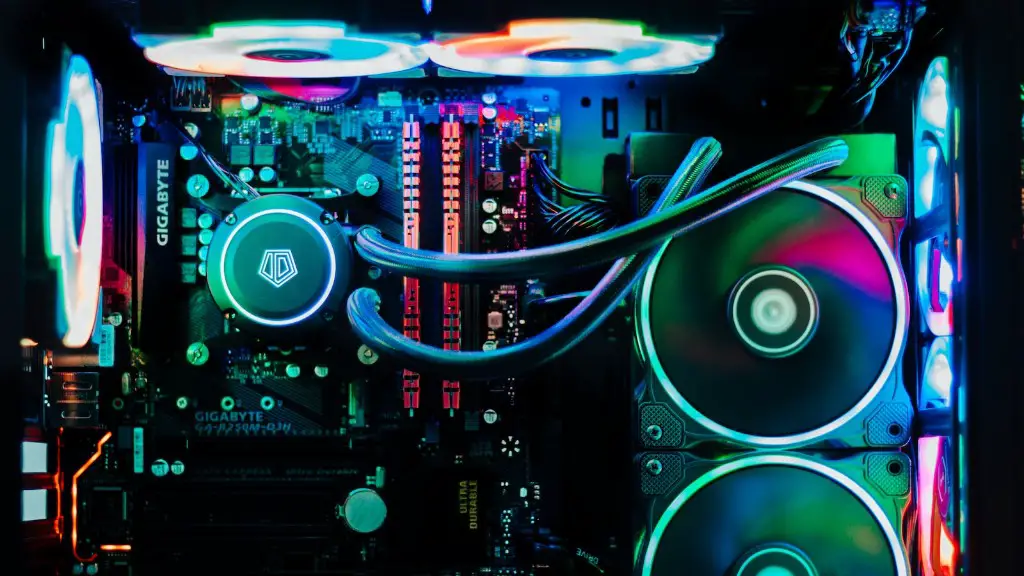
When selecting memory, it is important to choose a model that is compatible with the other components in the PC and is also reliable. The type and speed of the memory should be taken into account, with DDR4 being the current recommended model for 4K gaming PCs.
Storage
Storage is also an important factor to consider when building a 4K gaming PC. There are two main options when it comes to storage, hard drives and solid state drives.
Hard drives are the cheaper option and offer a high capacity of up to 8TB with prices ranging from $50 to $200. On the other hand, solid state drives are more expensive and offer a much lower capacity of up to 1TB, with prices ranging from $50 to $400. The decision between the two types of storage will depend heavily on the tasks that the PC will need to perform.
It is also important to select a storage device that is reliable, as it is likely to store a lot of the data that is used in the gaming PC. Therefore, one should compare prices between the different models available and read the reviews from customers.
Cooling System

The cooling system for a 4K gaming PC is also an important factor to consider. Without adequate cooling, the PC will quickly overheat and run the risk of permanent or irreparable damage. Therefore, one should select a cooling system that is adequate for all the components in the PC.
Cooling systems can range from basic air cooling systems to those that use liquid cooling. Air cooling systems use fans and coolers to draw heat away from the components, whereas liquid cooling systems use bigger components to cool down the processor and video cards. The cost of cooling systems can range from less than $50 to more than $200 depending on the performance level desired.
When choosing a cooling system, it is also important to consider the noise that it produces. There are some models that are designed with noise reduction in mind and these might be worth considering if the noise is a priority.
Case
When it comes to cases for 4K gaming PCs, there are many different sizes and types to choose from. At the basic level, the cases are generally made from plastic or metal and offer adequate levels of protection for the components. However, for those that want to take gaming to the next level, there are also a range of custom cases available.
The cost of cases can range from as low as $50 for basic models to upwards of $200 for custom cases. Therefore, it is important to decide what type of case is most suitable for the 4K gaming PC. Additionally, it is also important to consider the aesthetics of the case, as this will influence the overall look and feel of the build.
It is important to remember that the type of case chosen will also influence the noise level of the PC, as well as the amount of heat that it produces. So, choosing a case that is designed to reduce noise and heat might be worth considering.
Peripherals
When building a 4K gaming PC, one should also consider the peripherals that might be necessary. Keyboards, mice, headsets, controllers and speakers are just some of the peripherals that are worth considering. The cost of peripherals can range from less than $50 for basic models to upwards of $500 for high-end models.
The choice of peripherals depends heavily on the tasks that the PC is being built for. For gamers, a gaming keyboard, mouse and headset are likely to be the most important peripherals. Additionally, for those wanting to engage in virtual reality, a headset and controllers will be necessary.
It is also important to consider the aesthetic appeal of the peripherals. For example, if the PC is designed with a certain theme, one should select peripherals that match this theme. Furthermore, the weight and comfort of the peripherals should be taken into account, as these influence how well they can be used.
Finally, one should make sure that the peripherals selected offer good value for money and are reliable. Reading reviews from customers can help to provide insight into the quality of the product.
