Building a gaming PC tower is an art form. It requires knowledge of both hardware and software, as well as understanding of basic computer architecture. But with a little patience and the right parts, it’s possible to create a powerful gaming machine capable of playing the latest titles at maximum settings. Here’s how to go about building your new gaming PC.
Step One: Pick your parts. First, decide which CPU, RAM, hard drive, motherboard, graphics card and power supply to use. This is probably the hardest part, and requires research into various components and considerations of cost versus performance. Try to find parts that are compatible with each other, as this will simplify the build. Once that’s done, it’s time to order the pieces.
Step Two: Prep the case. Preparing the case for your new parts is the next step. This is where you’ll need to attach the mainboard to the I/O shield and screw the board into the case. It’s important to make sure the board is connected and seated properly before proceeding, as any mistakes here could result in a bad build. Be sure to use screws of the correct length and don’t forget to attach the standoffs.
Step Three: Install the CPU and RAM. Installing the CPU is relatively straightforward, as it’s the same procedure for any Intel or AMD processor. Make sure the locking lever is unfolded, then line up the CPU with the socket and gently lower it. RAM installation is just as easy, just make sure to orient the sticks so that their notches line up with the slot before pushing them in.
Step Four: Attach the Hard Drive. After the CPU and RAM are installed, it’s time to attach the hard drive. First, attach the required cables and screws to the drive, making sure to connect the SATA and power cables. Then mount the drive into the case, usually on the top side or in one of the bays. This varies depending on your case, so be sure to consult the manual.
Step Five: Install the Graphics Card. Installing the graphics card is the next step, and is essential for serious gaming. To do this, remove the side or top panel of the case, then insert the card into a PCI-E slot. (Some cases may have additional mounting screws to stabilize the card, which is also recommended). Next, connect the power cables then reinstall the panel and any screws removed.
Step Six: Hook up the Power Supply Unit. The last step before powering on the PC for the first time is to connect the power supply. Start by plugging in the 24-pin main power cable, then connecting the power supply to the graphics card. After that, the cables from the power supply should be connected to the drive and motherboard. Once that’s done, your PC is ready to be powered up!
Install the Motherboard and Cooling System
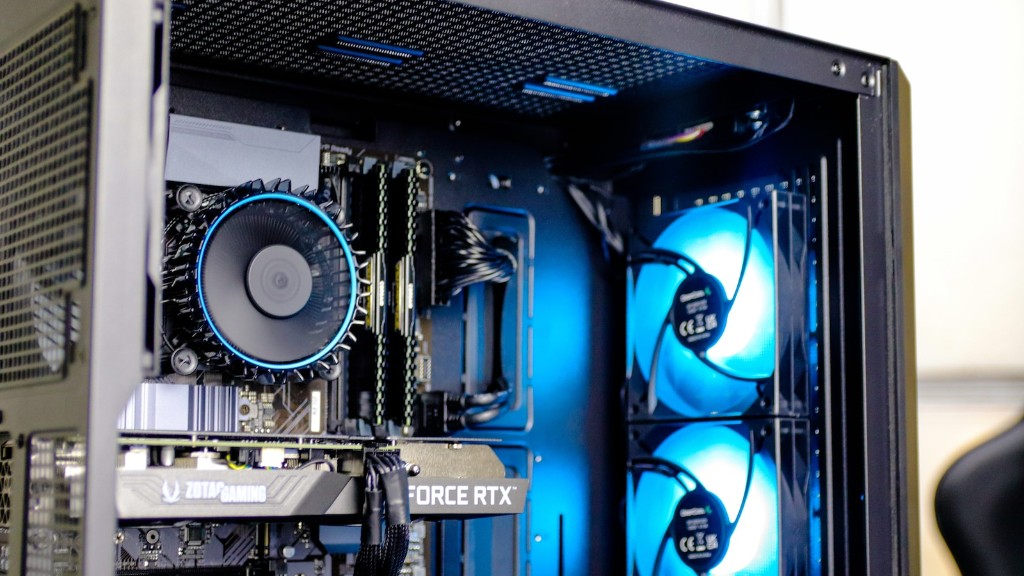
The last two steps for building a gaming PC tower involve installing the motherboard and cooling system. First, attach the I/O shield to the motherboard, followed by the CPU fan and bracket. Be sure to situate them correctly, then add a layer of thermal paste on top of the CPU. Next, insert the RAM into the motherboard’s RAM slots, making sure the notches line up correctly. Once that’s done, the motherboard can be screwed into place.
Finally, it’s time to install the cooling system. This may involve a liquid cooling loop, or an air cooling setup. Install the fan and radiator, or the radiator and water block. Make sure the fittings and pipes are connected correctly, then top off the coolant and fill the loop. Boot up the PC for the first time and check to make sure everything is running well.
Connect the Peripherals
Now that the components are all installed and the tower is running, it’s time to connect the peripherals. This involves connecting the power and data cables from the monitor, keyboard, mouse and any other devices. Take care to connect the cables securely to avoid any potential data loss. Once all the connections are established, the PC is ready to go.
For a great gaming experience, it’s also essential that the software environment is in top shape. Before playing the latest titles, be sure to update the OS and graphics drivers. Installing Steam, Origin and other gaming services is also recommended, as they make it easier to find and buy new games.
With all of that done, you’re ready to start gaming. The system should be ready to tackle even the most demanding games on the market, and with a bit of tweaking and overclocking, you should be able to squeeze out even more performance.
Monitor the Temperatures
One of the most important tasks when building a gaming PC tower is to monitor the temperatures. It’s important to keep temperatures in check, as sustained running at high temperatures can cause the system to fail. With a liquid cooling system, it’s even more important, as leaks can cause costly damage.
To make sure temperatures are staying in the safe range, use a monitoring software such as HWMonitor or Speedfan. This will allow you to check the temperatures of the CPU, GPU, RAM, and other components in real-time. Set up a fan profile or an automated setting to ensure temperatures stay optimal when gaming.
Upgrade As Needed
Over time, you may find that your gaming PC isn’t running the latest games as well as it should. To keep your system up-to-date, upgrade it as needed. This may involve upgrading the graphics card, adding more RAM, or replacing the CPU and motherboard. Make sure to research and budget for any upgrades before hand, as this will make the process so much easier.
Proper care and maintenance are also important for a long-lasting gaming PC tower. Make sure to vacuum the interior regularly, as dust build-up can lead to overheating and component failure. Checking and changing the thermal paste regularly is also essential, as this is the main component that helps dissipate the heat generated by the system.
With some basic know-how and careful research, it’s possible to build a great gaming PC tower. Start by picking the right parts, and make sure to consult a hardware expert if uncertainties arise. Then prepare the case and install the components, followed by connecting the power supply and peripherals. Once that’s done, you’re ready to game like a pro.
