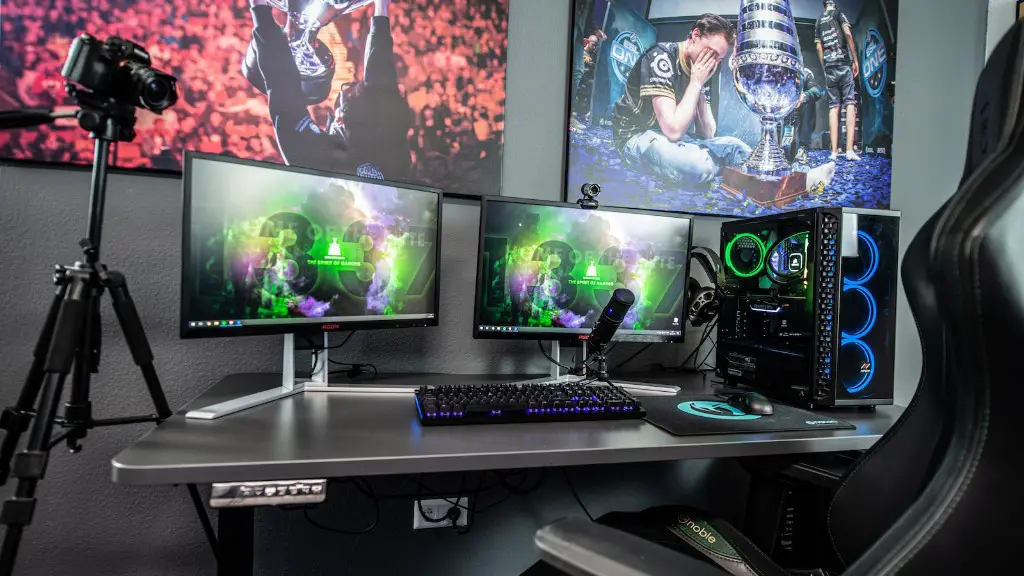
Buying the right gaming pc can be a daunting task. To make a successful purchase, it is important to measure the machine’s capabilities against your preferences in terms of graphics, speed, and sound. Here are some tips on how to know what gaming pc to buy:
First, consider your budget. Gaming PCs come in a range of prices, from budget-friendly models to premium ones. Think about how much you are willing to spend and strike a balance between the features you want and your budget.
Second, know your gaming needs. If you are looking for intense gaming with high-quality graphics, a powerful gaming pc is the way to go. On the other hand, if casual gaming is your thing, a laptop or entry-level gaming pc should do the job.

Third, decide on the type of processor. This will decide your pc’s speed and power. Intel Core processors offer the highest performance and use the greatest amount of energy, while AMD Ryzen processors are cheaper and have a good energy efficiency.
Fourth, consider the graphics card. This will determine the visuals of your games. If you are a fan of 4K resolutions and detailed visuals, then an Nvidia GeForce RTX card is the way to go. If you are more into casual gaming, a lower-level graphics card should suffice.
Fifth, look for the amount of RAM. The amount of RAM in a pc determines how quickly it can process data. If you are looking for the highest performance, 16 GB of RAM is recommended. However, 8 GB is still more than adequate for casual gamers.
Sixth, decide on your preferred storage. Solid state drives (SSDs) are quick and reliable, but are more expensive. Hard disk drives (HDDs) are slower, but provide greater storage capacity.
Seventh, consider connectivity options. For maximum compatibility, look for gaming PCs with a wide range of ports, including Ethernet, HDMI and USB.
Graphics Cards
The graphics card is a crucial factor when selecting a gaming PC. It determines the realism and overall detail of your games. NVIDIA and AMD are leading manufacturers of graphics cards and provide a range of cards to suit different budgets.
If you are looking for high-end gaming with 4K resolution and smooth performances, a top-end card such as the NVIDIA GeForce RTX 2080 Ti is recommended. It comes with 11 GB of GDDR6 memory and Ray Tracing technology for stunning visuals.
On the other hand, if you are looking for something more affordable and casual gaming is your thing, then consider cards such as the NVIDIA GTX 1050 or the AMD RX 580. These cards are suitable for mid-level gaming and provide good graphics quality at an affordable price.
When selecting a gaming PC, it is important to choose the graphics card that best fits your gaming needs. Top-end graphics cards are expensive but provide the best gaming experience. Lower-priced cards are more suitable for casual gaming.
Make sure to take your budget into account when making your choice. If you are new to PC gaming, you may want to start with a more affordable card and upgrade later on when your skills improve.
Finally, be sure to check for compatibility with your monitor. Different cards require different numbers of ports and it is important to ensure that your gaming PC and monitor are compatible.
Processors
Processors determine your gaming pc’s speed and performance. Intel and AMD are the two leading processor manufacturers, and each provides a variety of models to suit different needs.

If you are looking for a high-powered gaming experience and maximum performance, then Intel Core processors are the way to go. These premium processors offer superior speed and multitasking capabilities and are the ideal choice for serious gamers.
At the lower end of the spectrum, AMD Ryzen processors offer good performance for more affordable prices. Ryzen processors are suitable for casual gaming and provide good energy efficiency. A Ryzen processor can deliver similar performance to an Intel for a fraction of the cost.
When purchasing a gaming PC, make sure to choose the processor that best fits your gaming needs. Intel Core processors offer the highest performance but are quite expensive. AMD Ryzen processors provide good performance at more affordable prices.
It is always important to consider your budget when making your decision. However, never compromise too much on the processor as it is the heart of your gaming pc and will determine its capabilities.
It is also worth considering the number of cores and threads the processor offers. More cores usually mean better multitasking, allowing you to have multiple applications running at the same time with minimal performance drops.
Finally, it is essential to check the processor’s compatibility with your motherboard. Most sockets are compatible with both Intel and AMD; however, certain boards may be incompatible with certain processor models.
Cooling
Cooling is an important factor to consider when buying a gaming PC. Overheating can lead to poor performance, shortened life spans, and even permanent damage to the system.
The two main types of cooling systems for gaming PCs are air cooling and liquid cooling. Air cooling is the most common type and uses fans to circulate air around the components. Liquid cooling systems use a combination of fans, heat pipes, and radiators, and are generally more efficient at dissipating heat.
When selecting a gaming PC, make sure to check the manufacturer’s cooling system. Look for a reliable cooling system with plenty of air intake and ventilation. If you are looking for a high-end gaming experience, consider a liquid cooling system for maximum performance.
It is also important to consider the noise level of the cooling system. Gaming PCs with powerful GPUs may require larger cooling systems which can generate loud noise. To reduce noise levels, look for systems with quieter fans and efficient heat sinks.
Finally, it is worth considering the size of your gaming PC. Larger PCs tend to generate more heat and may require larger cooling systems. Make sure to check the size limits when deciding on the cooling system to ensure that it fits in your gaming PC.
Power Supply
The power supply is an important part of any gaming PC, as it provides the power necessary for your components to operate. Choosing the wrong PSU can cause system shutdowns and damage to your components, so it is important to make the right choice.
When selecting a power supply, it is important to consider the wattage rating. The wattage rating determines how much power the PSU can deliver to your components. Ideally, you should select a PSU with 20-30% more wattage than your system requires.
Make sure to check the PSU’s efficiency ratings as well. 80 Plus ratings are the most common, ranging from Bronze (80-89% efficiency) to Titanium (94-97% efficiency). Higher efficiency ratings can save money in the long run as less power is wasted as heat.
Finally, it is worth considering the size of the PSU. Smaller PSUs provide less power and may be inadequate for powering multiple GPUs or high-end components. Make sure to check the size limits of your gaming PC when selecting the power supply.
Peripherals
Peripherals are essential components of any gaming PC and are what set the system apart from other computers. There are a wide range of peripherals available to choose from, depending on your budget and gaming needs.
Some of the most important peripherals for gaming PCs include keyboards and mice. Mechanical keyboards are the best choice for gaming, as they provide tactile feedback and are more durable than membrane keyboards. Advanced gaming mice are equipped with features such as adjustable weights, laser sensors, and adjustable DPI settings.
Another important peripheral for gamers is a gaming headset. Audio is an important aspect of gaming and a good gaming headset provides immersive sound and clear communication. Look for noise-canceling features, adjustable earpieces, and good sound quality.
Finally, it is worth considering gaming monitors. Monitors come in a range of sizes and resolutions, from 1080p to 4K. Response time is also important, as low response time ensures smooth visuals without any delays or lag.
When selecting peripherals, consider your budget and gaming needs. It is worth spending a little more to get a high-quality product that will last you for years. Make sure to check for compatibility with your gaming pc as well.
