Is $1,000 good for a gaming PC? Well, that depends on what you expect the PC to do. For some people, it might be enough for an entry-level gaming PC if you’re willing to compromise on some of the components. For others, it might not be enough to get the performance they want. Ultimately, it comes down to your budget, the type of games you want to play, and the overall performance you’re hoping to get out of the system.
If you’re looking just to do some gaming on the fly, then $1,000 might be good enough. You can expect to get a decent entry-level PC with an Intel Core processor and 8GB of RAM, plus a mid-range graphics card for gaming. This is enough for moderate gaming at lower settings and resolutions, but won’t be capable of handling the most demanding AAA titles at max settings. It’s also worth noting that this level of gaming PC won’t have a lot of storage capacity or room for expansion.
For those looking for higher performance gaming PCs, it’s hard to squeeze any type of decent performance out of $1,000. Sure, you could go with a cheaper AMD Ryzen processor, more RAM and a more powerful graphics card, but you’d still be playing at lower settings. For the best gaming performance, you’re likely going to have to invest in $1,500 or more, depending on the type of games you want to play.
Another thing to consider is the other components in the gaming PC. Some of the more important components, such as power supplies, motherboards and sound cards, can be expensive and hard to find when building your own system. It’s also worth considering any coolers, fans or other accessories you might need to purchase in order to get optimal performance from your system. All of this can quickly add up, so $1,000 might not be enough if you’re looking to build a custom gaming PC.
Ultimately, it comes down to what you’re looking for in a gaming PC. If you just want to do some casual gaming, then $1,000 might be enough. But if you’re looking to build a high-end gaming rig, then you should plan on budgeting at least $1,500 or more. Either way, do your research and make sure you’re getting the best components for your budget before making any major purchases.
What Else Can I Do With $1000?
If $1,000 isn’t enough to get the gaming PC you want, what else can you do with the money? There are plenty of other ways to use $1,000 if you’re not quite ready to invest in a powerful gaming PC. You could always purchase an entry-level gaming console, either a PlayStation 4 or an Xbox One, which would be less expensive than building a gaming PC. You could also upgrade your existing PC with a better graphics card or more memory, which might be enough for lighter gaming.
You could also invest in a gaming laptop, which can provide decent gaming performance, depending on the model. It might be worth looking at some of the more budget-friendly models from brands like MSI and Acer. This way, you can get a decent gaming laptop under $1,000 that can do double-duty as a gaming and work machine. Alternatively, you could use the money to purchase peripherals to improve your gaming experience, such as a high-end gaming mouse or a gaming monitor.
Finally, you could always put the money towards a new college course or hobby. If you’re looking to get into web development or coding, then $1,000 might be more than enough to get the necessary courses, books and equipment to get started. Or maybe you’re looking to get into music production or video editing. All of this can be done quite affordably, especially if you shop around for used gear.
What Should I Look For When Buying A Gaming PC?
When shopping for a gaming PC, it’s important to keep an eye out for the components that will be integral to the machine. Obviously, the processor, graphics card and RAM are the most important elements, so it pays to spend some time comparing prices and specs. Take the time to read reviews to get a better understanding of what to expect from each component.
In addition to the main components, be sure to consider factors such as storage, power supplies and cooling systems. These are all important in ensuring that your system runs smoothly, without any performance issues. It’s also worth considering the type of games you plan to play and whether the PC you’re looking at will be able to handle them. Each game has different hardware requirements, so it’s worth checking out the system requirements before making a purchase.
When it comes to accessories, it’s important to budget for these ahead of time. You’ll likely have to buy at least one gaming monitor and a good mouse and keyboard. If you plan on playing VR games or streaming videos, then you’ll need to invest in the necessary accessories for these activities. It’s also important to budget for the cost of any games you plan to purchase.
Finally, consider what sort of warranty comes with the PC. Some manufacturers offer limited warranties on certain components, which can be helpful if something goes wrong. It’s worth considering the policy before you purchase, especially if you’re investing a lot of money into the PC.
Are Gaming PC Components Interchangeable?
One of the great things about a gaming PC is the ability to upgrade or replace certain components. The most common update is the graphics card, as this is usually the component that will determine your overall gaming performance. It’s also possible to upgrade your processor or RAM, although this will depend on the motherboard and other components in the system.
For those looking for more affordable updates, storage, coolers, and sound cards can all be replaced or upgraded. You can find relatively affordable storage solutions such as hard drives and solid state drives. As for coolers, air and liquid coolers can both provide improved temperature management, depending on the type of games you play and the components you have in your system.
Finally, gaming PCs tend to come with budget-level sound cards, so consider upgrading if you want better sound quality. Look for discrete sound cards that use higher-end audio codecs and technologies such as Dolby Atmos. This will provide an immersive experience when gaming, listening to music, or watching movies.
What Are The Benefits Of Gaming PCs?
Gaming PCs provide better performance than consoles and support a wider range of games. This makes them ideal for those who want the best performance when playing their favorite games. They also provide better graphics, faster load times, more consistent framerates and higher resolutions than console gaming.
Gaming PCs are also much more customizable than consoles. You can easily switch out components, upgrade to the latest hardware and tailor the system to your needs. You can also customize the components for a look or feel that is unique to you. Additionally, since PCs are open architecture, you can get support and advice from a vast community of gamers and developers who can offer help and advice.
Finally, gaming PCs are much more affordable than buying a console. Building from individual components can often be cheaper than buying a console, and allows you to choose the best parts for your budget. Additionally, many components can be bought used, which can further reduce costs. This makes gaming PCs much more accessible, especially for those on a tight budget.
What Components Should I Upgrade For Improved Gaming Performance?
If you’re looking to get more performance out of your gaming PC, then there are a few components you should consider upgrading. The most important upgrade is usually the graphics card, as this determines the type of games you can play and the settings you can run them on. If you’re looking to play your games in 4K or even 8K, then you’ll likely need to invest in a higher-end card.
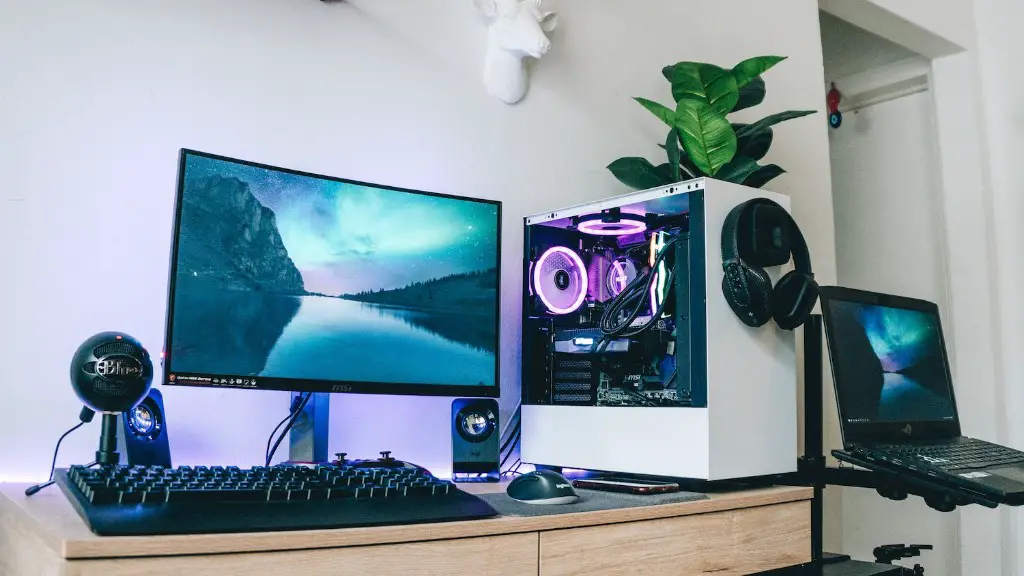
If you’re playing more resource-intensive games or doing more graphic-intensive tasks such as video editing, then you might need to upgrade to a higher-end CPU and a bigger heatsink to keep temperatures under control. More RAM can also help, especially if you’re running multiple programs at the same time. Finally, you can always upgrade your storage, either with a bigger hard drive or a faster solid state drive for faster boot times and improved gaming performance.
Before you upgrade, be sure to do your research. Not all components are interchangeable and certain components may require additional components or special tooling to install them. Additionally, if you’re going to be replacing any components, it’s important to make sure they’re compatible with the existing system. Otherwise, you might end up with a system that won’t work or might cause more problems.
In general, it’s always a good idea to find out what you need and research your options to make sure you’re getting the best components for your money. Don’t be afraid to go second-hand if it helps you get the performance you want.
