Gaming PCs have been part of the gaming landscape for many years now, and they have become an essential part of any gaming setup. But, is one fan enough for an effective gaming PC? When it comes to PCs, some gamers believe that having multiple fans is necessary to keep the system cool and functioning optimally, while others believe that a single fan is sufficient. To answer this question, it is important to take a look at the basics of fans and how they work.
Fans are one of the primary forms of cooling for PCs, and they come in many sizes and shapes. Generally speaking, fans are made to move air from a hotter area to a cooler area. A fan’s capacity to move air is measured in cubic feet per minute (CFM) and the size and type of fan used also affect its performance. Therefore, when deciding how many fans to use for cooling your gaming PC, it is important to take into consideration the size of the fan and its CFM rating.
When using a single fan to cool a gaming PC, the best approach is to use a larger fan that has a high CFM rating. This larger fan will be able to move more air and will help keep the system cooler. It is also important to ensure that the fan is directed in the right direction, as this will help ensure that the air is flowing in the most efficient way. Additionally, if the fan is mounted improperly, it can cause turbulence and noise, which can reduce the performance of the PC.

On the other hand, the use of multiple fans can provide additional cooling benefits. Multiple fans can be used to move air from different areas of the system and thereby disperse the heat more effectively. Additionally, the use of multiple fans can create better airflow and help provide better cooling throughout the entire system. Furthermore, by using multiple fans, it is possible to reduce the noise levels in the system, as the fans can be configured to run at different speeds.
To sum up, when it comes to cooling a gaming PC, a single fan may be adequate in some cases. However, the best approach is to use a larger fan with a high CFM rating, and to make sure that it is correctly mounted and directed. Additionally, multiple fans can provide additional cooling benefits and help ensure proper airflow throughout the system. Therefore, it is important to make sure that you have the right number of fans, and that they are correctly positioned and sized for the best performance.
How Many Fans Do You Need?
The most common question when considering which type of cooling system to use for a gaming PC is, how many fans do you need? Depending on the size and type of system, as well as the expected workload, the number of fans that are needed can vary greatly. Generally speaking, a good rule of thumb is to use at least two fans, but it is important to consider the size of the fans, the system’s airflow, and the type of components in the system.
To determine the number of fans that you need for your gaming PC, it is important to consider the size and type of system, as well as the expected workload. If the system is larger, or if it is going to be used for more intensive tasks, then more fans may be necessary. Additionally, the type of components in the system, such as graphics cards, hard drives, and power supplies, can also affect the need for additional fans.
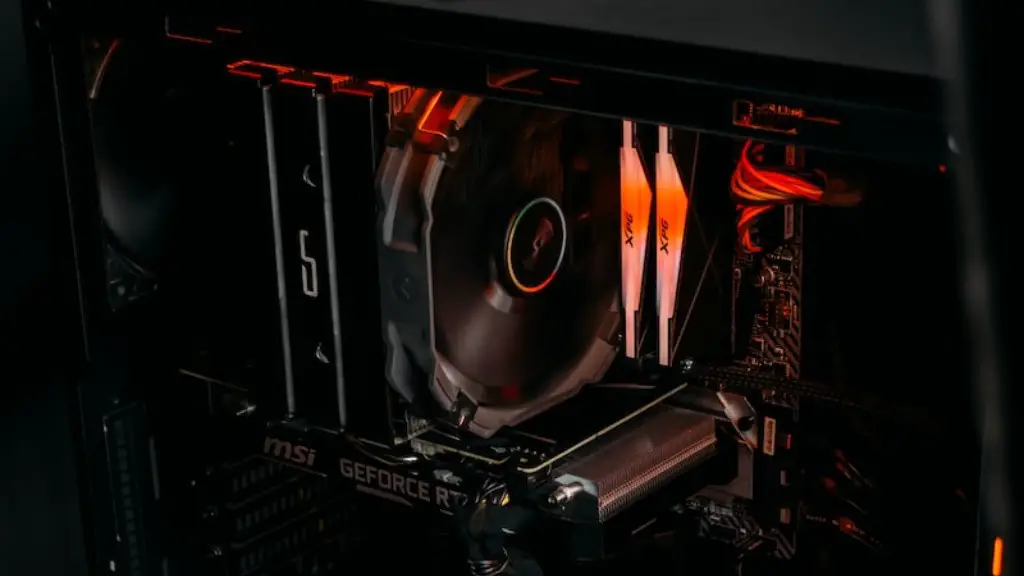
When selecting a fan for your gaming PC, it is important to remember that the fan size, the RPMs, and the CFM rating are all important factors. A larger fan with a higher RPM and CFM rating is generally better at cooling and can move more air than a smaller fan. Additionally, the type of fan used can also affect performance, as some fans are much quieter than others. Ultimately, it is important to choose the right type of fan for your system, as well as the right number of fans, to ensure that it is properly cooled.
How To Position Your Fans?
When it comes to your gaming PC cooling, the position of the fans is also important. Fans should be correctly positioned in order to ensure that they are able to move air in the most efficient way and to provide the best cooling. Generally speaking, intake fans should be facing outside, while exhaust fans should be placed in areas where hot air can be easily removed from the system.
The location of the fans is also important. When mounting fans, it is important to make sure that they are not obstructed, as this can reduce their efficiency. Additionally, it is important to make sure that the fans are not too close to any other components, as this can cause noise and distortion. Ideally, the fans should be spaced evenly throughout the system, in order to ensure proper airflow.
Additionally, the speed at which the fans are running can also affect their performance. Generally speaking, fans should be running at their highest speed when cooling is needed, and running at a lower speed when cooling is not required. It is also important to make sure that the fan speed is balanced throughout the system, as this can also affect performance.
Finally, it is important to ensure that the fan’s direction is correct. Generally speaking, intake fans should be placed in areas where the intake can draw in cool air, while the exhaust fan should be placed in areas where hot air can be removed from the system. Additionally, it is important to make sure that the fan blades are pointing in the right direction in order to ensure maximum airflow.
What Wattage Should Your Fans Be?
Another important consideration when it comes to choosing the right fans for your gaming PC is the wattage. Generally speaking, the higher the wattage rating, the more powerful the fan will be, and the more effective it will be at cooling your system. Additionally, it is important to make sure that the wattage rating is balanced across all the fans in the system, as this can also affect performance.
When choosing a fan for your gaming PC, it is important to look at the size of the fan and its overall capacity to move air. Generally speaking, larger fans with higher RPM and CFM ratings are better at cooling, as they are able to move more air. Additionally, when deciding on the wattage rating of your fans, it is important to consider the size of the fan, as well as the expected workload of your system. Higher wattage fans are generally more powerful, and can move more air, while lower wattage fans are less powerful, and may not provide sufficient cooling for intensive tasks.
Finally, it is important to make sure that the fans you choose are compatible with your system. Some fans are designed for specific types of motherboards, and can cause compatibility problems if used in another type of system. Additionally, it is important to consider the noise levels of the fans, as some fans can be extremely loud and may be disruptive in some cases.
Which Material Is Best For A Gaming PC Fan?
When selecting fans for your gaming PC, an important consideration is the material of the fan. Generally, fans are made of either plastic or metal, and the material used can affect both the performance and the lifespan of the fan. Plastic fans are typically less expensive and can provide good airflow, but are not usually as durable as metal fans.
Metal fans are usually more expensive than plastic fans and can provide better airflow and cooling performance. Additionally, metal fans are usually more durable and are less likely to break or wear down. However, the downside to metal fans is that they can be heavier and can be more difficult to install. Ultimately, when choosing a fan for your gaming PC, it is important to consider both the cost and performance of the fan to determine which material will be the best option.
Additionally, it is important to consider the type of fan you are using. Generally speaking, there are four main types of fans, including axial fans, blower fans, sleeve bearing fans, and radial fans. Axial fans are low cost and are great for general use, while blower fans are better at moving air over longer distances and can be used in higher performance systems. Sleeve bearing fans are quieter and more durable, while radial fans are best used in smaller systems.
Finally, it is important to consider the noise level of the fan. Generally speaking, the faster a fan rotates, the more noise it will generate. Therefore, it is important to choose a fan with a low RPM, as this will help to reduce the noise generated by the fan. Additionally, some fans are designed specifically to be quiet, and are usually more expensive than regular fans.
How To Choose The Best Fan For Your Gaming PC?

When it comes to choosing the best fan for your gaming PC, there are several key factors that should be taken into consideration. Firstly, it is important to consider the size of the fan and its CFM rating, as this will help determine how much air it can move. Additionally, the type of fan and the number of fans should be taken into consideration. The material used in the fan and its noise level are also important considerations, as these can affect the performance and longevity of the fan.
It is also important to take into consideration the wattage of the fan, as this can affect both performance and efficiency. Additionally, the direction of the fan and its position in the system should also be taken into consideration, as this can have an effect on the performance of the fan. Finally, it is important to make sure that the fan is compatible with the system, as this can affect its performance.
Ultimately, choosing the right fan for your gaming PC is an important decision, and one that should be based on the size of the fan, the type of fan, the expected workload, and the specific components in the system. Additionally, the wattage, material, and direction of the fan should also be taken into consideration, as these can all affect the performance and efficiency of the fan.
