
When it comes to selecting the best case for your gaming PC, there are a few considerations. It is important to choose the correct size, fan layout, and cooling capacity for your custom gaming machine. Cases come in a variety of shapes, sizes, and materials, which can make it intimidating to make the right choice. This article will unravel the mystery and explain the best gaming PC cases and what to look out for.
The first factor to consider is size. Most gaming PC cases come in three sizes: Mid Tower, Full Tower, and Mini ITX. Mini-ITX gaming PCs come typically come in smaller form factors and are best suited for space-limited setups. Full-tower cases are much bigger in size and can typically contain several components and drives. Mid-tower cases are the most common and offer decent room for PC parts and cooling.
The layout of the case fans is also important for building a powerful gaming PC. A good air cooling system will require open intakes for air and exhausts to expel hot air from the case. Cases with predetermined fan mounts should be chosen over ones without, as it allows for easier cooling configuration. Also, look for cases with quick-change fan filters to cut down on potential dust buildup.
For optimum airflow, the case should longer graphic cards and tall CPU coolers. As graphics cards tend to be the most power-hungry components, it’s important to get a model with plenty of room to attach additional fans and/or radiators if you are planning to have an all-out gaming PC.
Noise suppression is also a factor to consider when it comes to PC cases. Avoid buying cases with glass or plastic front panels, as they are not sound-proof and will likely cause your PC to be louder. Cases with sound-dampening foam material and fan mounts are the best option if you want your gaming PC to remain quiet under intense loads.
Finally, customization options should also be taken into account when choosing the best gaming PC case. Some cases come pre-fitted with integrated RGB lighting just to give your gaming setup a sleek feel. RGB lighting also allows gamers to customize their own lighting scheme and sync with their internal components. Some cases can also be decked out with cool stickers and decals to show off your custom gaming pride.
Cooling Capacity of the Case
In the modern age of gaming, the need for powerful gaming PCs has increased dramatically. Cases that can dissipate heat and circulate air effectively are paramount for any serious gaming enthusiast. Cases should have ample air intakes for cooling and enough exhausts to expel hot air. Make sure to double-check the cooling configuration of your chosen case so that it supports your intended GPU and processor cooling setup.
Most cases come with a combination of pre-installed fans and different fan mounts. Fans are the number one way to remove heat out of the case and should be chosen to fit your gaming build’s cooling solution. Consider buying an extra fan or two if your PC becomes frequently overheated.
Liquid cooling systems can also be installed in some higher-end cases. These bulky and monolithic cases are the best choice for serious gamers, as they can provide additional benefits like lowered temperatures, quieter operation, and even aesthetics to boot. Just remember to always check your case’s cooling configuration for compatibility before making your purchase.
Besides the fan setup, the material of the case can also affect how well it dissipates heat. Aluminum cases contain more metal and will usually transfer heat more quickly than plastic cases, although plastic will come with better soundproofing capabilities. Steel cases are typically more durable, but generally conduct heat well.
Different cases come with different cooling capabilities, so make sure to read reviews and compare different brands to ensure that your PC is cooled appropriately.
Design of the Case

It is important to also consider the look and feel of the case itself, as this part of your PC is going to be seen by everyone who looks at your gaming setup. Cases come in a myriad of designs, from more traditional looks to more modern designs with RGB lighting. Some cases stand out with vibrant colors and LED lights on the exterior, perfect for LAN parties and other events.
The degree of customization is also important when selecting a case. Some come with pre-fitted RGB lighting and a variety of different decals, while others offer the option to completely customize the outer system. If customizing is important to you, then make sure to look for a case that allows you to do that.
Finally, it is also important to consider the space of the case. If you plan to put your tower in a spacious area, you may want to opt for a Full-Tower case. If you plan to have it in a small space, then a Mini-ITX might be the better option.
With so much variety in the cases that are available today, it can be difficult to make a decision. Just make sure to consider all of the factors above when looking for the best case for your gaming PC.
Budget of the Case
Budget is, of course, an important factor to consider when buying a gaming PC. Cases vary greatly in price, depending on the features and quality of materials. Mid-tower cases, for example, usually range between $30 to $200, with the average price around $90.
Full-tower cases are typically more expensive, ranging between $100 to $500. Those who need the most high-end gaming systems, such as those used for esports, may opt for liquid cooling, which can easily push up the cost of a gaming case to $500 or more.
It’s important to consider both your intended purpose and budget when selecting a gaming PC case. Don’t buy something too expensive if your needs are minor. Conversely, if you need something with liquid cooling or a high level of customization, don’t be afraid to splurge a bit for higher-end cases.
Cable Management of the Case
The cable management of the case should also be taken into account when selecting the best gaming PC case. PCs without proper cable management will often look cluttered and disorganized, making it hard to troubleshoot components. Cases with cable management features such as pre-installed cable ties, velcro strips, and dedicated storage for cables makes cleaning and maintaining your setup a lot easier.
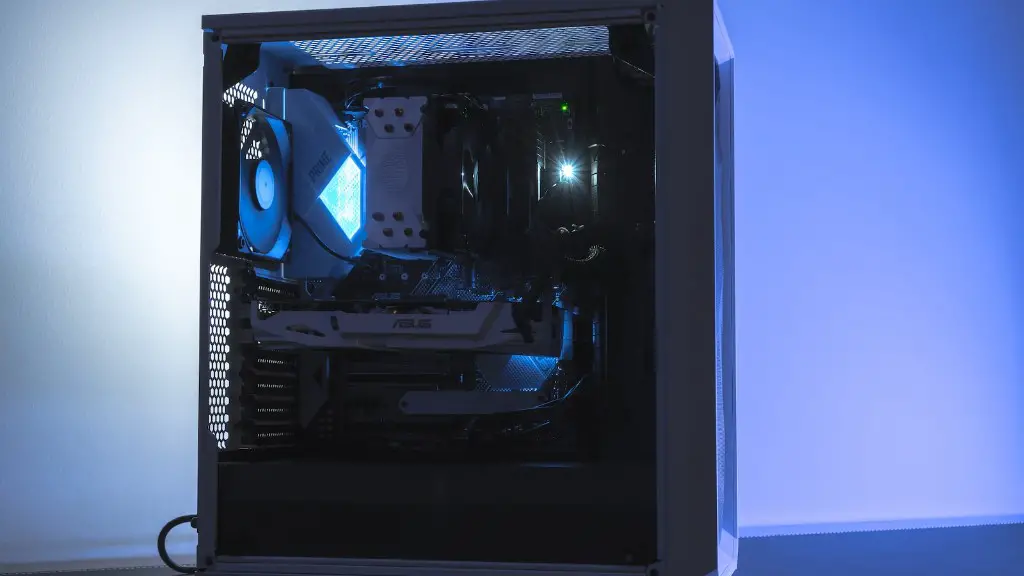
At a minimum, the case should feature plenty of cable routing holes, as well as space to hide the cables. This allows you to route your cables in a neat and organized manner. Also, read reviews to see how many cables can fit within the designated cable routing areas.
Most mid-tower and full-tower cases offer plenty of cable management options and spaces, while Mini-ITX cases tend to be more limited. Think about your needs when selecting a case and make sure that it comes with enough cable routing capabilities to fit your gaming PC.
Dust Filtration of the Case
Dust is one of the chief enemies of gaming PCs and cases with poor dust filtration can lead to reduced performance and shortened life expectancy of your components. That’s why it’s important to choose a case with reliable dust filtration features.
The two most important features for dust filtration are dust filters and removable filters. Dust filters are usually located on the front panel, top-panel, and/or side-panel of the case, and are designed to keep dust and other debris from entering your system. Removable filters, on the other hand, are usually found on the side and back of the case and should be removed and cleaned regularly.
Additional dust filters may be needed if you intend to keep your system dust-free, but they can be expensive. Also, remember that cases with tinted or opaque front panels can be a boon to dust filtration, as they are less likely to attract dust than transparent panels.
Dust filtration is an important factor to consider when choosing the best gaming PC case. Make sure to look for a case that offers good dust filtration capabilities, so that your components remain dust-free.
