
Physically Shopping for a Gaming Laptop
The internet age has made it easy to buy almost anything at the click of a mouse without ever leaving your home. But when it comes to buying something as important as a gaming laptop, physically going to the store and consulting an expert salesperson can often be helpful, especially for those not well-versed in the specifics of what makes a good gaming laptop.
For starters, salespeople are typically trained to help buyers find the laptop that best meets their needs. This includes making sure the customer gets the right type and speed of processor, enough memory and storage, and a high-quality graphics card that can handle intense gaming scenarios. They can also offer advice on different brands and models, as well as troubleshoot any potential compatibility issues the user may experience with other software and hardware.
Physically visiting the store can also provide the customer with another great opportunity; being able to test the laptop in-person. This means they can launch a few games, check out the resolution and colour, and test out the sound quality, all of which can have a major impact on their gaming experience. Additionally, they can rely on the salesperson’s advice, as well as their expertise in gaming laptop setups.

Finally, customers who physically purchase their gaming laptop gain the opportunity to consult a salesperson on discount options. Whether they are willing to make a purchase without bundled software, a trade-in offer, or other promotional discounts, stores can offer sizable savings on gaming laptops.
Online Shopping for a Gaming Laptop
In recent years, many shoppers have opted for the convenience of buying a gaming laptop online instead of physically visiting a store. There are several advantages to this approach, for example, customers can compare prices and features of multiple laptops in the span of a few minutes, read about warranties, possible configurations or even see what accessories the laptop comes with. The customer can also read reviews by users who already purchased the laptop, giving them an insight on how the laptop performs.
What’s more, online retailers often have special offers available, such as “free shipping” and other discounts. In addition, online retailers can often provide timely update information on the latest models being released and any new features they might have.
One drawback to online shopping is that without consulting a salesperson, the customer runs a greater risk of buying a laptop that is not suitable for their specific needs. It’s important to consider the type of processor, memory, and storage the laptop has, as well as the quality of its graphics card, as these are all important when it comes to gaming. Customers should also decide whether they need additional accessories, like a gaming mouse and headset, as these can add up to the cost.
Lastly, in addition to reading reviews from other customers, it’s important to remember that it may take a few days or even weeks to receive the laptop once the customer has placed their order. Additionally, if the customer needs to return or exchange their purchase due to any defects, it can take a substantial amount of time before a final resolution is reached.
Comparing Prices for a Gaming Laptop
Comparing prices is one of the first steps to finding a good gaming laptop. This can be done in a systematic way by looking at the prices offered by various online retailers, as well as those at physical locations. Additionally, customer can learn which retailers may offer special discounts, loyalty program points, or even convenient payment methods. These discounts can be quite substantial, with some retailers ‘bundling’ a laptop with a gaming mouse, headset, and other peripherals.
To supplement this, customers should also keep an eye on Black Friday and other holidays, as many retailers tend to offer discounts on certain products during those times. Further, customers should also consider searching for second-hands, refurbished, or even open-box options, as these offer more affordable prices while still providing the same functionality as brand-new units.
Finally, online comparison sites can provide the customer with a more comprehensive view of the total cost, as they provide details on the laptop specs, as well as the prices at a variety of online retailers. In other words, this makes it easier for the customer to find the right laptop at the right price.
Getting Advice on a Gaming Laptop
To get expert advice on picking a good gaming laptop, customers should consult trusted sources in the gaming community or even ask the salesperson in-person. Gaming enthusiasts, for example, often offer valuable insight and advice on the various laptops available in the market. This includes tips on which models are the best for gaming, as well as which features should be taken into account when making a purchase.
In addition to this, gamers may also provide information on new games being released, how well laptops can handle those games, and what upgrades can be made to maximise performance. This can be extremely helpful in deciding which laptop to buy, and can even save potential buyers a substantial amount of money.
Further, customer should consider the feedback given by their friends or family members who have recently bought a gaming laptop. These reviews and perspectives can provide vital information on certain laptops, as well as the experiences others have had.
Finally, customer should also do their own research. A simple online search can provide great information on a wide range of gaming laptops, including reviews, specifications, and prices. This can help the customer make an informed decision on the laptop that suits their needs.
Staying Up To Date on Gaming Laptop Releases
Staying up-to-date on the latest releases is essential for those seeking a gaming laptop. This includes news on upgrades to existing models, as well as information on new models being released. To keep tabs on this, customers should subscribe to news outlets or newsletters for the latest updates.
Additionally, customers should keep an eye on blogs and YouTube channels focused on gaming. Knowing what’s available can help customers take advantage of cutting-edge technologies and find the best laptop available in the market.
Forums can serve as another great resource. Here, people can ask others for advice on their laptop purchases, as these forums often contain detailed information and personal insights from experienced gamers. This can be even more helpful than salespeople, as users can ask specific questions and get detailed answers.
Finally, customers should consider joining a gaming community. Doing so can help them network with other gamers who have bought a laptop recently, as they can offer valid insights on what to get and what to avoid.
Choosing the Right Accessories for a Gaming Laptop
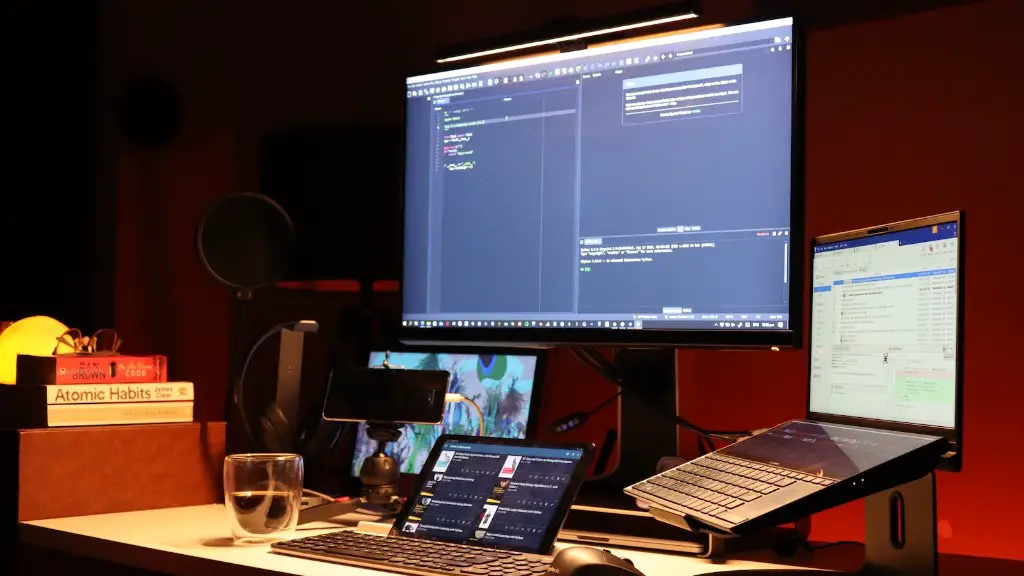
While the laptop itself is the main component of any good gaming setup, customers should also consider the accessories that come with it. These include gaming mice, keyboards, speakers and headsets, as well as additional storage devices and charging ports.
In terms of picking a gaming mouse, customers should consider the shape, size and design of the device, as well as its DPI and battery life. Additionally, customers should also consider the mouse’s build quality, as well as its ability to support additional buttons and profiles.
As for gaming keyboards, customers should look for RGB backlighting, mechanical switches, programmable keys, and the availability of special gaming keys. Further, they should ensure that the keyboard is comfortable and that it comes with a solid warranty.
Gaming speakers are another important accessory, as they can provide a more immersive gaming experience. Customers should consider the speakers’ power output, cable length, and configuration, as well as the type of surround sound and whether the speakers need to be plugged in or not.
Finally, customers should also consider buying a headset for gaming. Key features include surround sound, sound isolation, and noise-cancelling. Additionally, customers should check for battery life and any special features, such as custom-made memory foam ear-cups.
Managing the Cost of a Gaming Laptop
Buying a gaming laptop can be expensive, and customers should consider alternative methods to manage the cost of their purchase. One way to do this is by making the most of promotional deals, such as discounted bundles and loyalty programs. Customers should also consider going the second-hand or refurbished route, as this can considerably lower the cost of acquisition.
Further, customers should also look for any additional accessories that might come with their purchase. Doing this can provide customers with additional savings and could even help them avoid the need to buy additional peripherals later.
Additionally, customers should also search for promotional codes and discounts available from various websites. They should also remember to take advantage of special sale days and keep track of the latest products being released. Finally, customers should consider taking out a loan to cover the cost of the laptop, thus allowing them to remain within their budget.
Extending the Life of a Gaming Laptop
Proper usage and maintenance are key to keeping a gaming laptop in prime condition and extending its life. To ensure this, customers should remember to regularly clean their laptop using compressed air and a microfiber cloth. They should also avoid using any liquid-based cleaners on the device to prevent damage.
It’s also important to keep the laptop’s hardware up-to-date. This can include updating the laptop’s drivers, as well as replacing the HDD with an SSD or adding more RAM. Additionally, customers should keep an eye on their laptop’s battery and regularly clean out the fans to prevent accumulation of dust and grime.
Further, customers should be careful with their laptop and make sure to protect it when travelling or carrying it around. This includes using a good quality laptop bag or backpack, as this will provide additional cushioning for any incidental bumps or falls.
Finally, customers should also be wary of the software they install. Too many software applications can slow down the laptop, so customers should be selective in what they choose to install and keep an eye on their laptop’s performance.
