On the hunt for the best gaming monitor? You’re not alone. Deciding on the right gaming monitor is an important part of any gamers’ core setup. Getting the right features, display size and resolution, input lag, refresh rate and response time, and aesthetic aspects like design, ergonomics and budget can be overwhelming. To help simplify the process, here are some key factors to consider when comparing gaming monitors.
Resolution is one of the most important factors to consider when choosing a gaming monitor. It’s usually measured by width x height in pixels and is used to indicate the total number of pixels in a screen. The two most common resolutions for gaming monitors are 1080p and 1440p, with 4K being the newest resolution available and 8K on the horizon. When selecting a resolution, it’s important to take into account your GPU’s capabilities and if the resolution is supported by your game. The bigger the resolution, the better the picture quality that can be displayed, so if you’re able to, opt for a higher resolution.
Refresh rate measures how fast the image on your monitor is refreshed. This is measured in hertz (Hz) and is important to ensure that your games are displayed smoothly. Monitors with higher refresh rates will be able to display more detailed images, with fewer motion artifacts, than monitors with lower refresh rates. For example, if you’re playing an FPS game, you’ll want to make sure you have a monitor with at least a 75Hz refresh rate, otherwise you’ll miss out on important details during intense action sequences.
Response time is the time it takes for a pixel to transition from one color to the next. It’s measured in milliseconds (ms) and the lower the response time, the better the image quality. Generally, a response time of 4ms or less is ideal for gaming, as it ensures that all images will be rendered without any visual artifacts.
Input lag is the amount of time it takes from when an input is made on your controller or mouse to when it’s displayed on your screen. This is vital for competitive gaming, as even the slightest delay can give your opponents the advantage. Look for monitors with input lag of less than 5ms, as this will ensure your inputs are synchronized and you have an edge over your opponents.
When choosing a gaming monitor, it’s also important to consider the design. This includes the bezel size, the thickness of the monitor and the material used. Bezel size is important because it affects your field of vision and the aesthetic of your setup. The material used also affects the overall look of your gaming station and the comfort of your gaming experience.
Finally, it’s important to consider your budget. Gaming monitors can be quite expensive and it’s important to select a monitor that fits your needs and budget. There are a range of gaming monitors available in all different sizes and price points, so there’s a perfect one for everyone. Once you’ve identified all the features you need, you can easily compare different brands, models and prices to find the one that’s right for you.
Display size
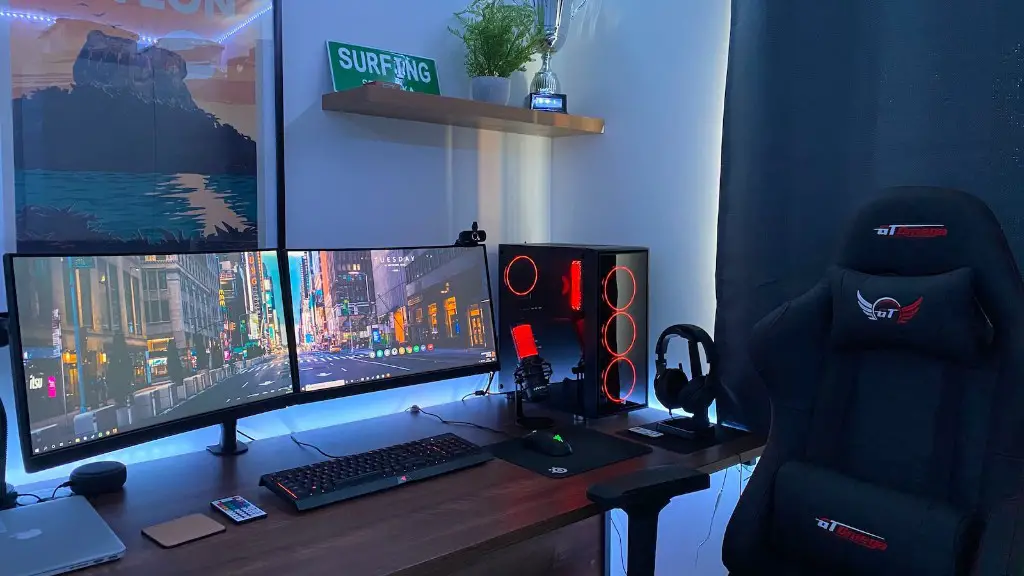
The display size is another important factor to consider when choosing a gaming monitor. Bigger is usually better when it comes to gaming but it’s also important to consider your desk space and budget. There are a range of display sizes available from 17 inches to 32 inches. Larger monitors may offer a more immersive experience, but they can also take up a lot of desk space and be more expensive.
When deciding on a display size, it’s important to consider the type of games you play. If you play a lot of fast paced games such as FPSs, a smaller display size may be beneficial as the field of view is constrained and can help you to spot enemies easier. Larger display sizes are usually better for slower paced games such as strategy games, as they can create a more immersive experience.
It’s also important to think about the amount of desk space you have available. If you have a smaller desk, you may want to opt for a smaller monitor to free up space. If you have a larger desk, a larger monitor may be beneficial. You should also take into account the resolution, refresh rate and response time as these features are more important than display size when it comes to image quality.
Finally, it’s important to consider your budget. Although larger monitors may offer a more immersive experience, they can also be more expensive. Consider the other features such as resolution, refresh rate and response time and try to find a monitor that offers excellent image quality and performance for your budget.
Ergonomics
Ergonomics is an important factor to consider when shopping for a gaming monitor, as the wrong monitor setup can lead to fatigue, strain, and injury. Ergonomic features help improve comfort by allowing you to adjust the height, tilt, pivot and swivel of your monitor to the perfect position for your eyes. Look for monitors that have adjustable stands and offer height, tilt and swivel adjustments, so you can find the best position for extended gaming sessions.
When adjusting your monitor, it’s important to ensure that the top of the monitor is level with your eyes, and that your eyes are at least an arm’s length away from the monitor. This will ensure the best viewing angle and reduce strain on your neck and back. Additionally, make sure the monitor is not glowing or reflecting any light, as this could cause strain on your eyes.
Monitor stands are also an important factor to consider as they will help to hold your monitor in a comfortable position for extended gaming sessions. Look for stands that offer adjustable height and width, as well as swivel, tilt and pivot adjustments. This will ensure that you can adjust the monitor to the best angle for your needs. Adjustable stands will also help increase airflow, improve cable management and provide a clean, organized look for your gaming station.
Finally, consider ergonomic accessories such as a monitor arm or wall mount. A monitor arm will help to support the weight of your monitor, improve viewing angles and create extra space on your desk. A wall mount can also be beneficial if you have a large monitor as it can free up desk space and provide a more secure mount for your monitor.
Aesthetics
Aesthetics are an important factor when purchasing a gaming monitor, as they can help transform your gaming setup into the perfect gaming station. Look for monitors that have sleek designs with narrower bezels, as this will help create a seamless look and make your gaming station look more organized. Additionally, consider features such as RGB lighting, which can help give your gaming station a unique look and make your setup stand out.
It’s also important to consider the material used for the monitor. Monitors with metal frames are usually more durable and provide more support, while plastic frames tend to be more lightweight. It’s also important to consider the aesthetics of the stand, as some stands are designed to look sleek and modern, while others may be designed with a more classic look. If you want to spruce up your gaming station, you may also want to look for stands that offer adjustable height, tilt and swivel adjustment, as this will further improve the aesthetics of your setup.
Finally, consider the monitor’s port selection. Most gaming monitors come with a range of ports such as HDMI, DisplayPort, USB-C and audio jacks that can be used to connect your PC, gaming console, speakers or other peripherals. Having a variety of ports can be beneficial, as you’ll be able to connect all of your devices with ease and have a cleaner, more organized gaming setup.
Budget
It’s important to consider your budget when shopping for a gaming monitor, as monitors can range from a few hundred dollars to thousands. When choosing a gaming monitor, you should consider the features you need and look for a monitor that offers excellent performance and image quality for the price. When comparing monitors, consider factors such as resolution, refresh rate and response time, as these features are more important than budget when it comes to performance.
Once you’ve identified the features you need, you should research the different brands and models available and compare prices. Doing this will help ensure that you get the best performance for your budget. Additionally, make sure to keep an eye out for sales and discounts, as you may be able to get a better price if you’re willing to wait for the right deal.
Finally, if you’re looking for a monitor on a tight budget, consider investing in a gaming monitor with a lower resolution such as a 1080p monitor. This will help to save money, while still providing acceptable performance for most games. Additionally, if you’re a competitive gamer, it’s important to invest in a monitor with a lower input lag and higher refresh rate, as these will be beneficial for any fast paced gaming.
