
It is easy to comprehend why so many people are looking to build their own gaming PC. With so many new games released all the time and with the ever-increasing capabilities of hardware, it is an exciting process to construct a personal machine dedicated to your gaming endeavours. In this article, we will discuss the things you need to build a gaming PC.
To start off, you need a dedicated graphics card, also known as GPU. A dedicated graphics card provides the power required to render the video games at their highest settings. With such intense visuals, a dedicated GPU is essential for anyone aiming to take the plunge into PC gaming.
Second, a CPU (Central Processing Unit) is needed. The CPU is the brains or the “nerve centre” of the PC. This part of the PC needs to be powerful enough to handle everything that the GPU throws at it. It needs to crunch numbers quickly and handle multitasking with ease.
Third, RAM (Random Access Memory) is also essential. RAM is very important in PCs as it is what allows multiple applications to run at once. Without an adequate amount of RAM, even a powerful GPU & CPU will be hindered by the slow performance.
Fourth, motherboard is a necessity. The motherboard is an integral part of the PC as it is the main connection for the components. The motherboard acts as the “cement” of the PC and its vital to choose one that is compatible with the processor and graphics card that you choose.
Fifth, storage is necessary. You are going to need a lot of storage, if you are planning to download and keep multiple games. Most people opt to use a solid-state drive (SSD) as they offer quick loading times. For deep storage, an HDD can be used as an alternative.
Sixth, a power supply is also required. The power supply is what supplies the power to the other components in the PC. Without an adequate power supply, your PC is not going to be able to run to its fullest potential.
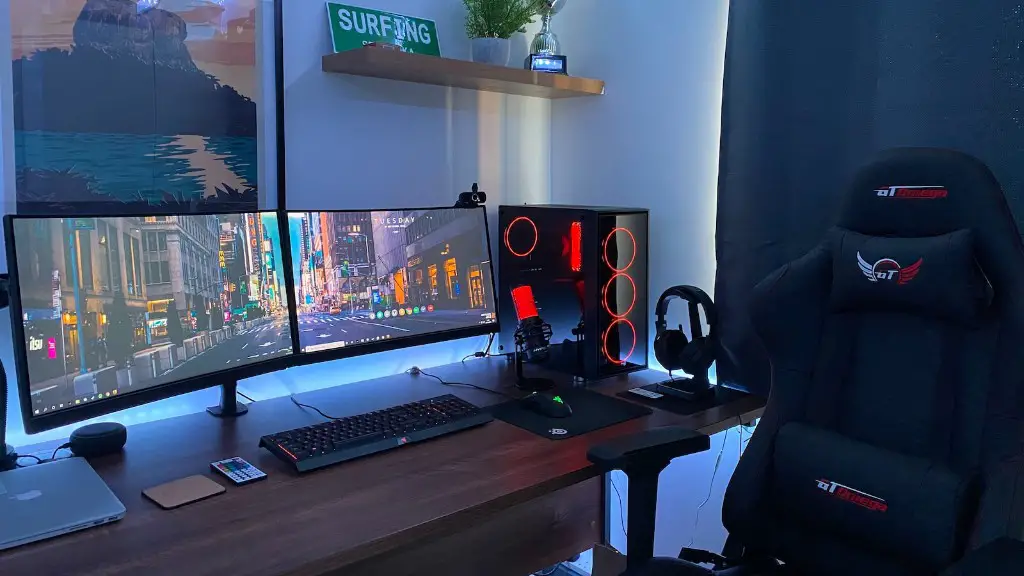
Finally, a casing is the last aspect you need to consider. The casing houses all the components of the PC and keeps the components from over-exerting themselves by providing a well-ventilated environment. It’s also important to get a case that is aesthetically pleasing.
GPU/Graphics Card
If you want great graphics in your video games, a dedicated graphics card is an absolute must. This piece of hardware works in tandem with the processor to properly render the visuals of the game, making for a smooth experience. You can opt for either an AMD or Nvidia GPU, both offer different levels of performance, however, it all depends on the type of games you will be playing.
It is important that you choose a graphics card that is in line with the resolution of your monitor, as well as the games you are playing. For instance, if you are playing a game that requires large amounts of GPU power, it would be essential to choose the most powerful graphics card you can afford.
Depending on your budget, the more powerful cards will add more money to your gaming PC build. However, once you have your GPU, all other peripherals are subject to the graphics card’s capabilities. So, it is important to choose a card that can handle any game you want to play.
CPU/Processor
The processor is the “nerve center” of your gaming PC. This piece of hardware is responsible for crunching numbers and allows for multitasking. It is essential that you get a processor that is compatible with your GPU and motherboard, otherwise, it won’t make the most of your PC.
In the past few years, Intel has been pushing their Core i7 brand of processors and AMD emphasizing Ryzen CPUs. Both CPUs have their pros and cons, however, when it comes to gaming, one must look at the number of cores the processor has, its clock speed and the Intel Turbo Boost technology.
In terms of bang-for-buck performance, the Intel Core i7-7700K is an excellent choice. It sports four cores with eight threads, a 4.2Ghz base clock speed and a 4.5Ghz turbo clock speed. This CPU is an excellent choice for anyone looking to build a gaming PC.
RAM/Random Access Memory
Random Access Memory is an essential component when it comes to gaming. RAM allows multiple applications to run smoothly and allows for multitasking with ease. Without enough RAM, even the most powerful processor or GPU will fail to render games properly.
For PC gaming, it is recommended to get at least 8GB of RAM and 16GB if you are playing games with high system requirements. Furthermore, when choosing RAM, you need to consider the type of RAM that is compatible with your processor and motherboard.
DDR4 RAM is the most common type for gaming PC builds, since it offers faster speeds than DDR3 RAM and is also more power efficient. Also, you need to consider the frequency and size of RAM sticks you will get. Generally, it is advisable to go with 8GB sticks and RAM that is rated at 2400MHz or higher.
Motherboard
The motherboard is the “cement” in your gaming PC build. All the peripherals are connected to it and it must be compatible with your components. Therefore, when choosing a motherboard, you need to consider the socket type, size, RAM slots and type of RAM, as well as the number of PCI-Express slots.
For example, if you are using an Intel CPU, you need an LGA 1151 socket and if you are using an AMD processor, you would need an AM4 socket. Additionally, make sure the motherboard has enough slots to accommodate multiple RAM sticks and also check to see if the type of RAM your are using is compatible with the slots available.

When it comes to size, you have the option of getting an ATX or micro ATX. ATX motherboards offer more features, whereas, the mATX offer the same features in a miniaturized form factor. It all depends on the size of your PC case.
Storage
Storage is another crucial factor when it comes to gaming PCs. Without storage, you won’t be able to save your progress in games, download new games and also store files & documents. To remedy this issue, you need storage.
For quicker loading times, an SSD (Solid State Drive) should be considered. SSDs offer faster read & write speeds than hard disk drives (HDDs) and are beneficial for gamers that are playing graphically intensive games. However, SSDs come in lower capacities, so you will need to keep this in mind when planning your build.
HDDs are more capable of offering deep storage. HDDs usually have capacities ranging between 1TB to 6TB and are also more economical than SSDs. As a result, you can use both drives to build a great gaming PC.
Power Supply
The power supply is an essential piece of hardware as it delivers power to other components within your PC. Without a powerful enough power supply, your PC will not be able to run effectively.
It is important that you choose a power supply that is compatible with your motherboard and other components. A “modular” power supply is recommended for ease of installation, as it allows you to connect the cables that you need without having to deal with a bundle of cables. Furthermore, it is important to get a power supply that is efficient and has a good warranty.
Also, when it comes to gaming PCs, it is ideal to get a power supply that has at least 600W of power. Generally, the more powerful the power supply, the more efficient it is and the more reliable it will be in the long run.
Casing
The casing is what houses your components, so it is important to choose one that is reliable. Also, you should choose one that has plenty of ventilation to keep the components well-cooled. Aesthetics should also be a concern as people like to show off their builds.
Generally, popular cases range from mid-towers to full-towers, typically in the size of an ATX or mATX. Full-tower cases are capable of housing multiple components and can also support multiple graphics cards, however, the size and weight may be a problem for some.
Also, don’t forget about the small details such as the number of USB ports it has, the type of ports it has, the amount of RGB that can be connected to it and the price.
