
For gamers and computing power-hungry professionals alike, what constitutes the strongest gaming PC can mean quite a lot. It’s a seemingly simple question that involves a variety of factors. Let’s consider the components that make up a high-end setup and why they contribute to a gaming PC’s strength.
We can start with the CPU, or central processing unit. This is the mind of the computer, with the most modern offerings packing multiple cores for parallel processing and multiple threads for multitasking. Some processors can go up to the tens-of-cores range, making them the core of any gaming rig. The best processors come from Intel and AMD, and if you are looking to get the best out of your money, you should opt for one of these.
The main thing to consider with processors is the core clock speed and number of cores. A high clock speed will provide consistent performance in games, as well as extremely fast loading times. The more cores you have, the more powerful your PC is going to be, as more cores will be able to handle tasks in parallel.
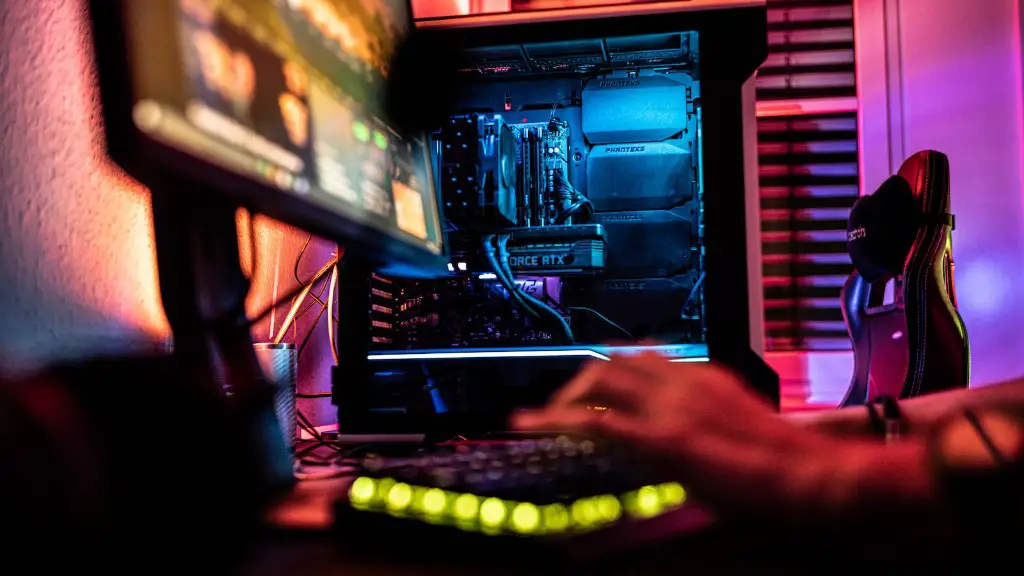
The next important component comes in the form of RAM, or Random Access Memory (RAM). This plays an important role in deciding the overall strength of your gaming PC, since RAM allows your processor to access information from different areas of the computer’s memory very quickly. The DDR4 format is the most recent memory technology, and it is usually offered in 16GB or 32GB capacity. As for RAM frequency, the higher it is, the faster your PC will run.
Graphics cards are also a key component when it comes to gaming PCs. These cards process 3D visuals and can be quite expensive when you opt for high-end cards. The most powerful graphics cards come from Nvidia’s RTX 20 series and AMD’s Ryzen 5000 series. You will need at least 8GB of graphics memory if you are looking to play the latest games in full detail.
Storage options also come in to play here. You could opt for a Basic Hard Disk Drive (HDD) with a good capacity, or you could go for the fastest-performing storage – Solid State Drives (SSD). SSDs come in 256GB or 512GB capacities, with 1TB and 2TB capacities being offered from some vendors. SSDs are essential for gaming, as they offer blazingly fast loading speeds that will make your gaming experience much smoother.
Finally, a power supply capable of delivering a consistent and clean supply of juice is essential to any gaming PC you build. It’s important to be aware of the power requirements of the components you’re planning to purchase and choosing an appropriate supply unit.
Graphics Card
Graphics cards are the main component when it comes to the performance of a gaming PC. Modern cards are powered by dedicated GPUs that handle the processing of visuals, textures and all the other assets you experience in your games.
Modern graphics cards range in cores and memory, and it pays to opt for the most powerful cards available for an optimal gaming experience. Nvidia’s RTX 30 series are currently the most powerful GPUs in the market thanks to technology like Ray Tracing and DLSS. AMD also have their own Radeon RX 6000 series that offer similar features, though they aren’t as powerful as Nvidia’s cards.
When it comes to memory, you’ll have to factor your gaming setup’s resolution into your GPUs. For 4K gaming, you will be looking for cards offering at least 8GB of dedicated GDDR6 memory. If you are pushing for the ultimate performance, then you will probably want a card that can offer more than 16GB.
Storage Options
When purchasing a gaming PC, storage options also play a major role in determining the power of your setup. We’re talking both types of storage here – traditional Hard Disk Drives (HDDs) and blazingly fast Solid State Drives (SSDs).
When purchasing a gaming PC, it’s most common to get a combination of both. An HDD will offer massive capacities at affordable prices, whilst SSDs offer blazingly fast loading times for your games. The recent trend is towards 1TB capacities for both HDD and SSD. If you are budget conscious and don’t plan on playing games with large file sizes, then a smaller 500GB capacity might be all you need.
Power Supplies
Perhaps the most overlooked component when it comes to gaming PCs is the power supply. If you are gunning for the highest performing setup, it pays to invest in a high-end supply offering over 500W of continuous power.
It’s also important to factor in the type of connector your components require. If you are looking to use a modern GPU, then it would be wise to opt for a power supply offering GPU connectors. This ensures that your GPU gets the maximum amount of power when gaming.
Cooling Solutions
When pushing your gaming PC to the limit, cooling solutions become paramount. Without the correct cooling, components will suffer from high temperatures, eventually leading to system instability and possibly even hardware failure.
At a minimum, a good gaming setup will require some form of air cooling. This can come from traditional fans mounted on the case, or from larger liquid cooling systems. The latter offers lower temperatures and quieter operation, but will require more maintenance.
It’s also possible to utilize the usage of specialized compounds known as ‘thermal paste’ between components and heatsinks. This compound enhances the cooling performance of a system and allows the components to operate at a lower temperature.
Monitor

Finally, you can’t overlook the importance of a monitor when building a gaming PC. A high refresh rate monitor is paramount for smoother motion, whilst an ultrawide display can provide a more immersive gaming experience.
Modern displays can offer up to an 8K resolution at a 60 Hz refresh rate. This should be the goal for any gamers looking to take their gaming to the next level. If you are the competitive type, then a higher refresh rate or adaptive-sync technologies like G-Sync can be beneficial for aiming and movement.
OS
Operating systems also make a difference when it comes to gaming PCs. For gamers, the most popular choice is usually Windows 10 due to its library of games and wide range of features. It’s also important to select the correct version of Windows, be it the Home, Professional or Ultimate edition.
Other popular choices include Linux, which can provide lightweight performance and reliable stability, and Mac OS X if you are using an Apple device. Ultimately, the OS you choose depends on your gaming habits, as well as your budget.
Peripherals
For gamers, peripherals are as important as the components of the PC itself. Keyboards, mice, headsets and controllers are all important pieces of equipment that will contribute to the overall gaming experience.
When it comes to peripherals, it’s all about preference. Some gamers prefer mechanical keyboards, whilst others may find them too loud. Similarly, some gamers prefer wired mice, whilst others prefer the wireless feel. In any case, choose the peripherals you feel most comfortable with and that suit the types of games you plan to play.
Networking
Finally, having a fast and reliable internet connection is essential when it comes to getting the most out of a gaming PC. You will need at least a 20Mb/s connection for playing most games, with faster connections giving you an advantage over your opponents in competitive games.
Opting for wired networking over wireless is also advised, as wired connections offer lower latency, meaning faster responses and less lag in online games. Opting for providers with a good reputation and high connection speeds should be a priority if you plan on gaming online.
Component Comparison
If you are looking to purchase the most powerful gaming PC, you will need to pay close attention to the specs of the components you are planning to buy. For example, when comparing two processor models, you must consider the number of cores and clock speeds. The same goes for graphics cards, where you need to look at the type of GPU, its core count, and the capacity of its memory.
Storage devices should be chosen for their capacity and performance. For example, a 1TB HDD will offer good storage for games on a budget, but if you are chasing the best performance, you should opt for an SSD offering at least 256GB of storage.
You should also pay attention to the power supplies you choose, and ensure that your components are not underpowered, as this can lead to system failure. Finally, you should invest in reliable cooling solutions, be it a standard high-end fan, or an advanced liquid cooling setup.
