Gaming is an incredibly popular hobby and more PC gamers are entering the market every day. Choosing the best RAM for gaming can be tough, and a lot of gamers feel overwhelmed by the plethora of options out there. If you’re having trouble, don’t worry – we’ve got you covered. In this article, we’ll be looking at what RAM is, what kind of RAM you need for gaming, and how much RAM you’ll need for your gaming PC.
RAM stands for Random-Access Memory. It’s a type of storage that’s used to temporarily store data that your computer is actively using. RAM is important for gaming as it allows you to multitask more effectively, boosting your gaming performance. The more RAM you have, the better your gaming experience will be.
When it comes to buying RAM, you’ll want to make sure you’re getting the right kind. DDR4 is currently the best RAM for gaming PCs and it offers the best performance. You’ll also want to make sure the RAM is compatible with your motherboard. Make sure you check compatibility if you’re building your own gaming PC.
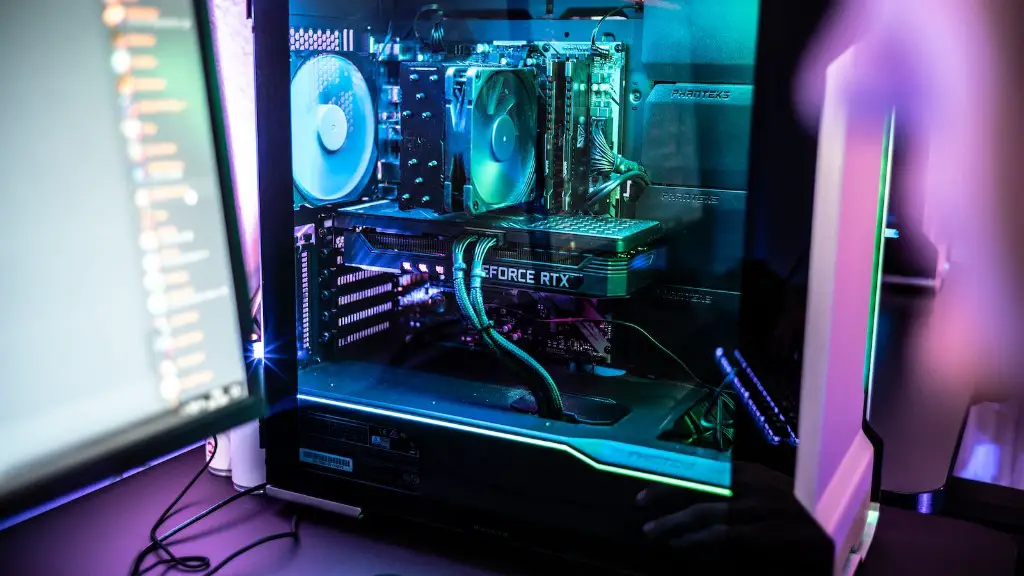
Choosing the right amount of RAM can be tricky. Generally speaking, 8GB is the minimum amount of RAM you’ll need for a gaming PC. If you’re running higher-end games, 16GB or more may be a better option. It’s better to err on the side of caution and get more RAM than you need to make sure your games run smoothly.
Once you’ve got the right RAM for your gaming PC, it’s time to install it. Installing RAM isn’t too difficult and you don’t need any special tools. All you need is a Phillips screwdriver and a pair of antistatic gloves. Make sure you turn off your PC before installing the RAM and reference your PC’s manual if you’re not sure how to do it.
Overall, choosing the right RAM for your gaming PC isn’t too difficult. Make sure you’re getting DDR4 RAM that’s compatible with your motherboard. 8GB is the minimum amount of RAM you should get, and you can get more if you plan on running higher-end games. Installing RAM is a straightforward process, so don’t worry – you’ve got this.
Understanding RAM Speed
When shopping for RAM for gaming, you’ll need to consider the speed of RAM. The speed of RAM is measured in megahertz (MHz) or gigahertz (GHz). The higher the speed, the faster the RAM will be. For gaming, 2400MHz or higher RAM is recommended, but you should choose the speed of RAM based on your budget. Higher speed RAM is more expensive, but it can make a big difference in gaming performance.
It’s also important to note that the speed of RAM can be affected by the speed of your CPU. If your CPU is running slower than the speed of your RAM, your RAM won’t be running at its top speed. Likewise, if your CPU is faster than the RAM, the RAM will be running at its top speed. This is why it’s important to consider both the RAM and the CPU when building a gaming PC.
It’s also important to note that RAM speed and latency can have an impact on your gaming performance. Latency is the amount of time it takes for the RAM to respond to a command. Lower latency means better performance, so you should look for RAM that has a low latency. Higher speeds usually come with lower latency, but it’s not guaranteed.
Overall, RAM speed is an important factor to consider when shopping for RAM for gaming. Make sure you choose RAM with a speed that’s compatible with your CPU and a low latency. Higher speeds can make a big difference in gaming performance, so if you can afford it, it’s worth investing in higher speed RAM.
Choosing Brands
When shopping for RAM for gaming, you’ll come across a variety of brands. Some of the most popular RAM brands include Corsair, G.Skill, and Kingston. Generally speaking, most high-quality RAM brands are reliable and effective. It’s best to choose a brand that has a good reputation for reliability and customer satisfaction.
Price is also a factor to consider when choosing a RAM brand. Generally speaking, higher-end brands tend to be more expensive, but they may offer better performance. If you’re looking for a budget-friendly option, there are plenty of quality RAM options that are affordable. Whatever you do, make sure you don’t skimp on quality. Cheap RAM will be prone to errors and crashes, so choose a reputable brand that has a good track record.
In addition to performance and price, you should also consider the customer support offered by the brand. Some brands offer warranties and customer support that can make life much easier if you run into any problems. Make sure you read reviews of the brand to make sure they offer quality customer support.
Overall, choosing the right RAM brand for gaming is an important decision. Make sure you choose a brand with a good reputation for reliability and performance. Price is also a factor to consider, but don’t skimp on quality. It’s also important to make sure the brand offers customer support, so read reviews to make sure they have a good track record.
RAM Timings
When shopping for RAM for gaming, you’ll also come across something called RAM timings. RAM timings are the numbers that describe how quickly your RAM can access data. When shopping for RAM, look for numbers like CAS Latency (CL) or tRCD. The lower the number, the better the performance of the RAM.
It’s important to consider RAM timings when shopping for RAM for gaming. Lower RAM timings can have a big impact on gaming performance, so make sure you choose RAM with low timings. Generally speaking, the lower the number, the better the performance. The best RAM for gaming will have timings of 9-10-9-27 or better.
It’s also important to note that RAM timings can be affected by the speed of your processor. Faster processors can usually support lower RAM timings, so if you’re using a faster CPU, you may want to look for RAM with lower timings. Additionally, make sure your motherboard can support the RAM timings you’re looking for before you buy.
Overall, RAM timings are an important factor to consider when shopping for RAM for gaming. Make sure you look for RAM with low timings and keep in mind that the speed of your processor can affect the performance of your RAM. Additionally, make sure your motherboard can support the RAM timings you’re looking for.
Overclocking RAM
Overclocking is the process of pushing components of your PC beyond their default settings to achieve higher performance. Overclocking RAM for gaming can have a big impact on performance, but it can also be tricky and can have an effect on the stability of your PC. Before you overclock, it’s important to make sure all of your components are compatible with overclocking, and you’ll need to have a good understanding of what you’re doing.
It’s important to note that not all RAM is designed to be overclocked. Some RAM may be more reliable at lower speeds, while other RAM may be designed to run at higher speeds. Make sure you look at the datasheet of the RAM you’re considering to make sure it’s designed for overclocking.
When overclocking RAM for gaming, you’ll need to start by increasing the speed in small increments and testing your system after each step. If you notice any instability, reduce the speed and test again. Once you’ve found a stable speed, you can adjust the RAM timings to further boost your performance. Keep in mind that overclocking can be dangerous if you don’t know what you’re doing, so proceed with caution.
Overall, overclocking RAM for gaming can have a big impact on performance, but it can be tricky and can have an effect on the stability of your PC. Make sure you’re familiar with the process before you try it, and read the datasheet of the RAM you’re considering to make sure it’s designed for overclocking. It’s also important to start with small increments and test after each step to make sure you don’t damage your PC.
